
Ever wondered how your phone, gaming console, or even your... Ipakita pa
 Irish
Irish English
Mag-sign up para makita ang contentLibre ito!
Access sa lahat ng dokumento
Pagbutihin ang iyong mga grado
Sumali sa milyong mga estudyante
Knowunity AI
Higit pa
Mga Asignatura
Triangle Congruence and Similarity Theorems
Triangle Properties and Classification
Linear Equations and Graphs
Geometric Angle Relationships
Trigonometric Functions and Identities
Equation Solving Techniques
Circle Geometry Fundamentals
Division Operations and Methods
Basic Differentiation Rules
Exponent and Logarithm Properties
Ipakita lahat ng paksa
Human Organ Systems
Reproductive Cell Cycles
Biological Sciences Subdisciplines
Cellular Energy Metabolism
Autotrophic Energy Processes
Inheritance Patterns and Principles
Biomolecular Structure and Organization
Cell Cycle and Division Mechanics
Cellular Organization and Development
Biological Structural Organization
Ipakita lahat ng paksa
Chemical Sciences and Applications
Atomic Structure and Composition
Molecular Electron Structure Representation
Atomic Electron Behavior
Matter Properties and Water
Mole Concept and Calculations
Gas Laws and Behavior
Periodic Table Organization
Chemical Thermodynamics Fundamentals
Chemical Bond Types and Properties
Ipakita lahat ng paksa
European Renaissance and Enlightenment
European Cultural Movements 800-1920
American Revolution Era 1763-1797
American Civil War 1861-1865
Global Imperial Systems
Mongol and Chinese Dynasties
U.S. Presidents and World Leaders
Historical Sources and Documentation
World Wars Era and Impact
World Religious Systems
Ipakita lahat ng paksa
Classic and Contemporary Novels
Literary Character Analysis
Rhetorical Theory and Practice
Classic Literary Narratives
Reading Analysis and Interpretation
Narrative Structure and Techniques
English Language Components
Influential English-Language Authors
Basic Sentence Structure
Narrative Voice and Perspective
Ipakita lahat ng paksa
6
•
Na-update May 5, 2026
•
Ever wondered how your phone, gaming console, or even your... Ipakita pa
Think of CAD as your digital drawing board, but way more powerful than anything you could imagine. Computer-Aided Design lets engineers, architects, and designers create incredibly precise 2D drawings and 3D models using specialised software.
The beauty of CAD lies in its versatility. You can design a phone case one day and help plan a skyscraper the next. It's revolutionised how we create things because it's faster, more accurate, and infinitely easier to modify than traditional hand-drawing methods.
Key terms you'll need: A 2D design is flat with just length and width (X and Y axes), like a floor plan. A 3D model adds depth or height , creating solid objects you can view from any angle. Rendering transforms your basic 3D model into a photorealistic image with proper lighting and textures.
Quick Tip: Remember that orthographic projection - those front, top, and side views from traditional TG - can be generated automatically in CAD software!
2D CAD works like an incredibly precise electronic drawing board. You'll use commands to draw lines, circles, and arcs with perfect measurements that the software tracks for you. It's brilliant for creating floor plans, circuit diagrams, or profiles for laser cutting.
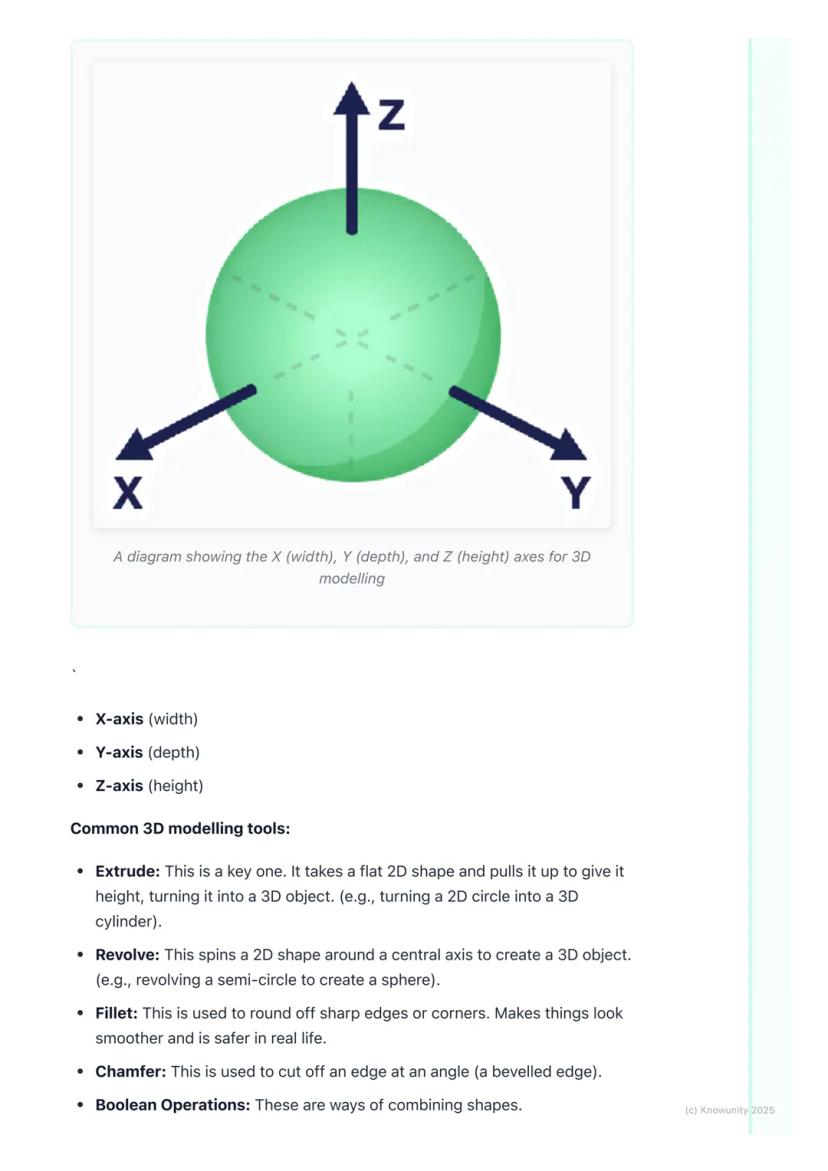
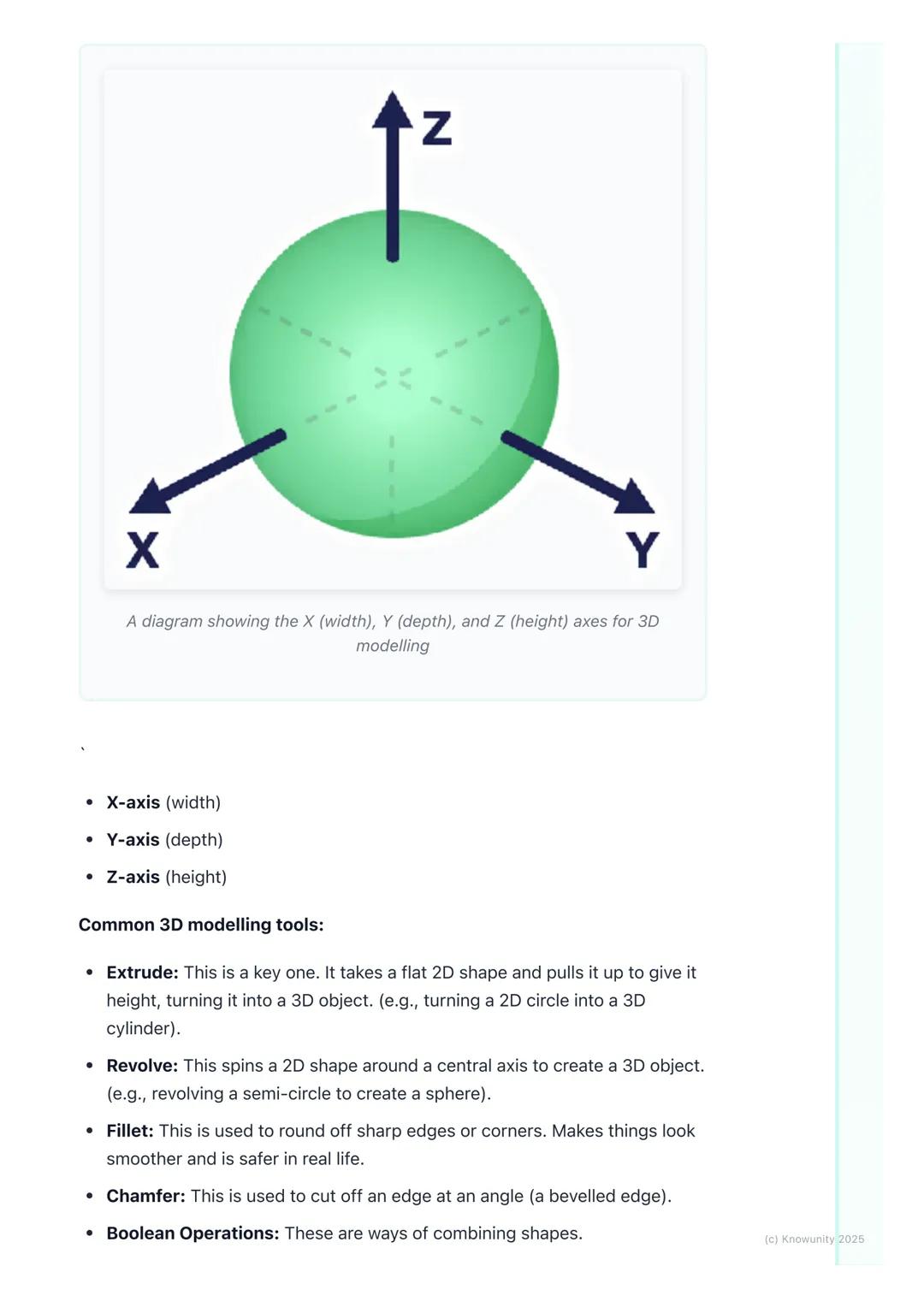
3D CAD is where things get exciting - you're essentially digital sculpting! Most 3D work starts with a 2D sketch that you then transform into a solid object by giving it depth. Remember the three axes: X-axis (width), Y-axis (depth), and Z-axis (height).
The most important 3D tool is extrude - it takes any flat 2D shape and pulls it up to create height, turning a circle into a cylinder or a square into a cube. Revolve spins a 2D shape around an axis (imagine spinning a semicircle to create a sphere).
Remember: Understanding these axes is crucial - they're the foundation of all 3D modelling work you'll do.
Once you've got your basic 3D shape, you'll need tools to refine it. Fillet rounds off sharp edges to make objects look smoother and safer, while chamfer cuts edges at an angle for a bevelled look.
Boolean operations are your shape-combining superpowers. Union fuses multiple shapes into one object - perfect for building complex designs from simple parts. Subtract uses one shape to cut holes in another, whilst intersect keeps only the overlapping parts of two shapes.
These tools might seem basic, but they're the building blocks of every complex CAD model you'll ever see. Master these fundamentals, and you'll be amazed at what you can create.
Pro Tip: Boolean operations are like digital Lego - you can build incredibly complex objects by cleverly combining simple shapes!
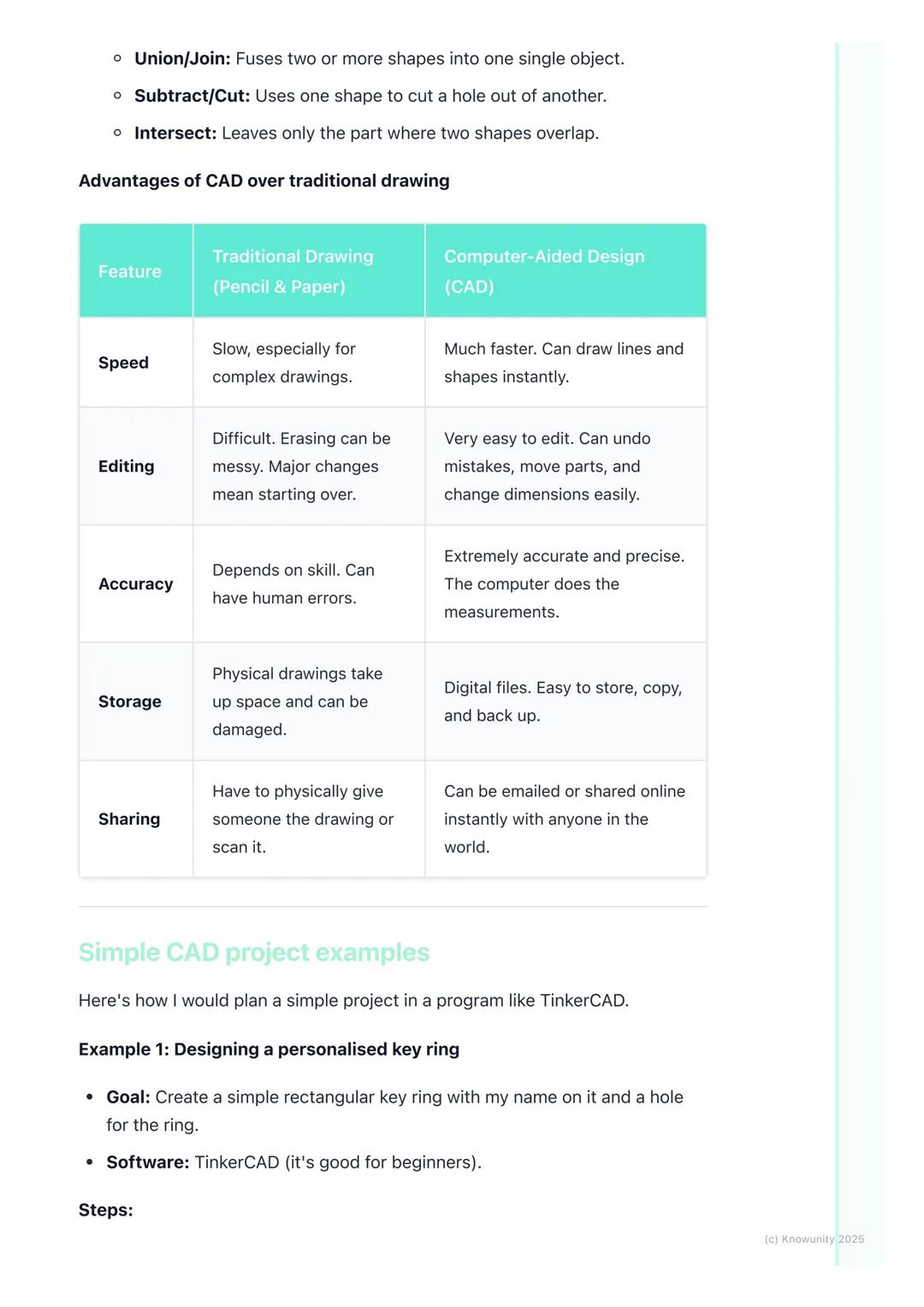
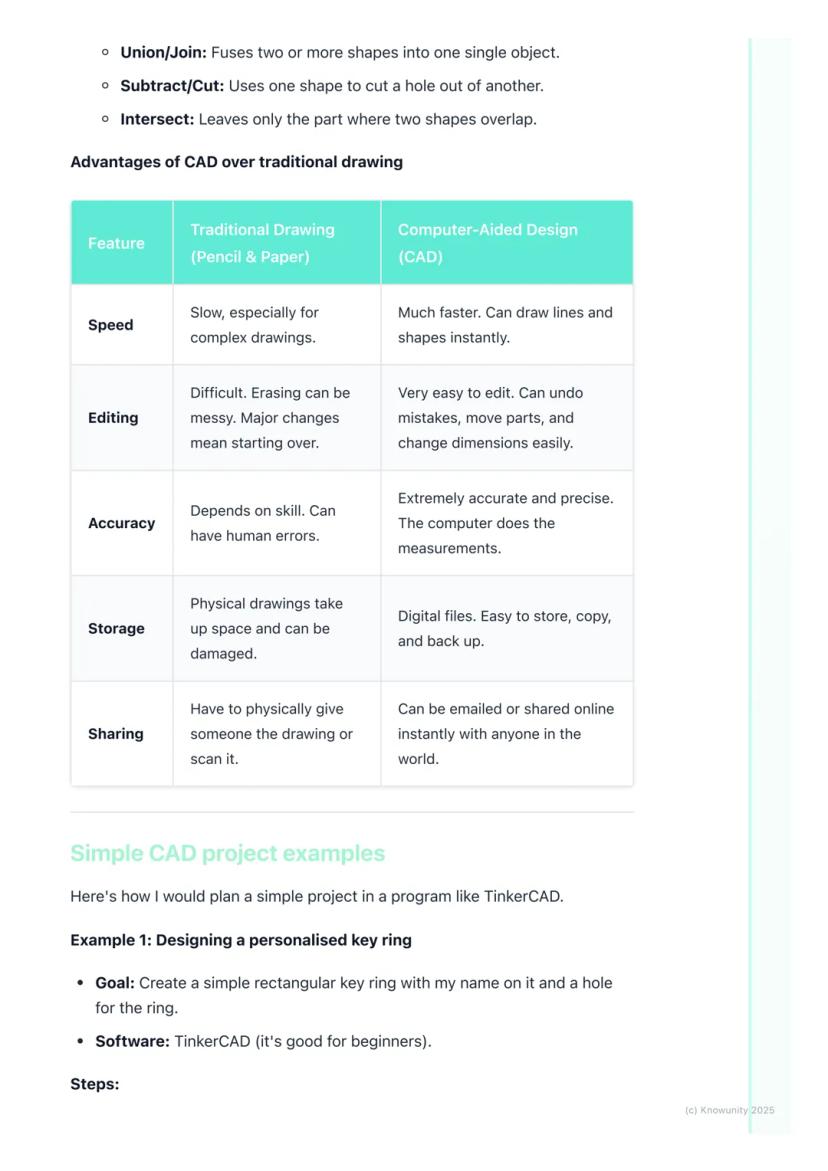
Let's be honest - CAD absolutely destroys traditional pencil-and-paper drawing in almost every way that matters. Speed? CAD wins - you can create perfect lines and shapes instantly. Accuracy? The computer handles all measurements, eliminating human error completely.
Making changes is where CAD truly shines. Messed up a dimension in traditional drawing? Start over. In CAD? Just click, edit, and you're done. Need to move an entire section? Drag and drop. Want to try a different design approach? Save a copy and experiment freely.
Storage and sharing are game-changers too. Physical drawings take up space, can be damaged, and sharing means photocopying or scanning. Digital CAD files can be stored forever, backed up easily, and shared instantly with anyone worldwide.
Real Talk: While traditional drawing skills are still valuable, CAD is what you'll actually use in most design careers.
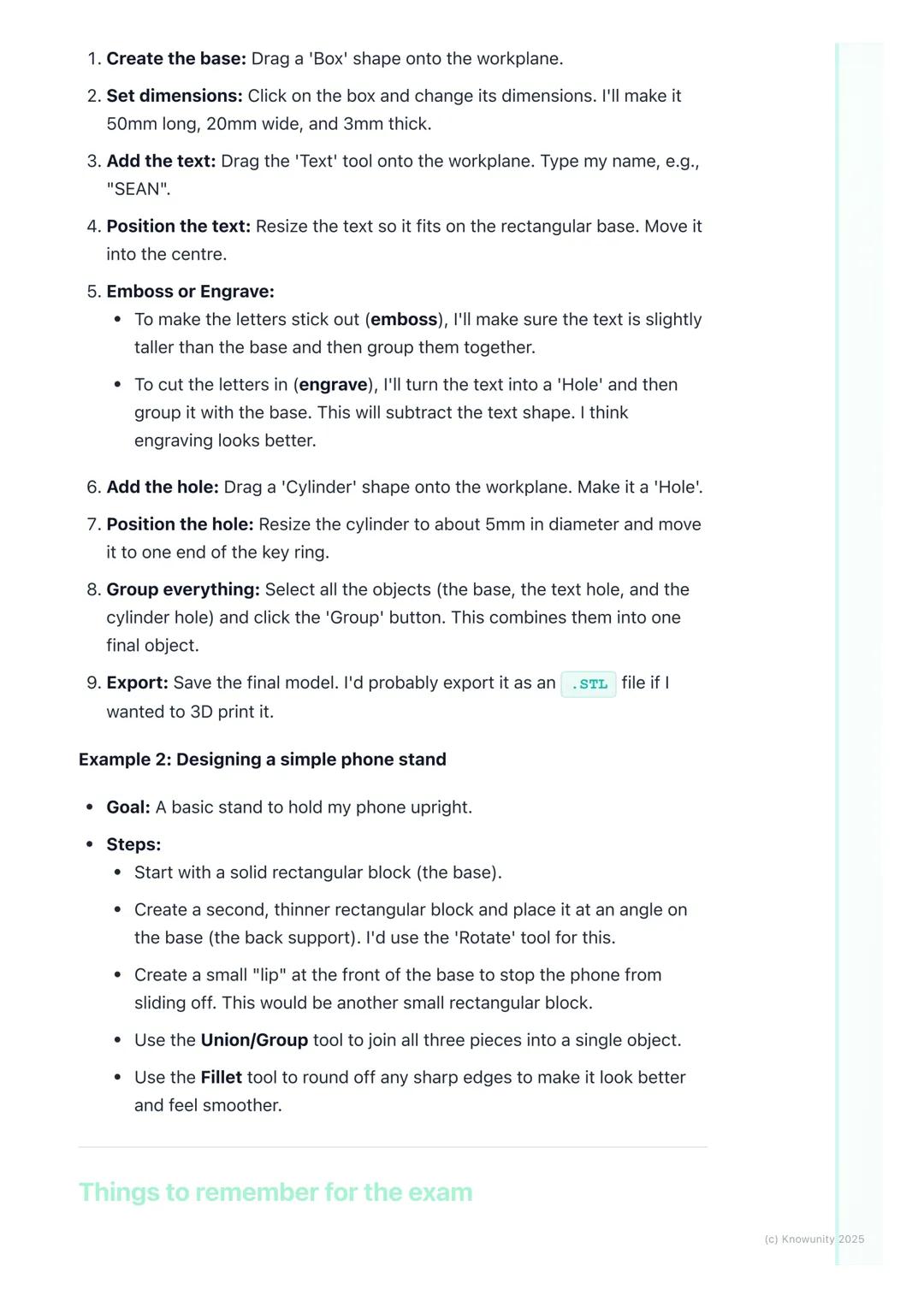
Let's design something you'd actually want - a personalised keyring using TinkerCAD. Start by dragging a box shape onto the workspace and resize it to 50mm long, 20mm wide, and 3mm thick.
Add your name using the text tool, then decide: do you want it raised (embossed) or carved in (engraved)? For engraving, change the text to a 'hole' and group it with the base - this subtracts the letters, creating carved text.
Create the key hole by adding a cylinder, making it a 'hole', and positioning it at one end. Finally, select everything and hit 'Group' to combine all elements into one finished object.
For a phone stand project, you'd build it from three basic rectangles: a base, an angled back support (use the rotate tool), and a small lip at the front to prevent sliding. Group them together and use fillet to smooth any sharp edges.
Success Strategy: Always save regularly with clear filenames like 'Keyring_v2.stl' - not 'random_thing.file'!
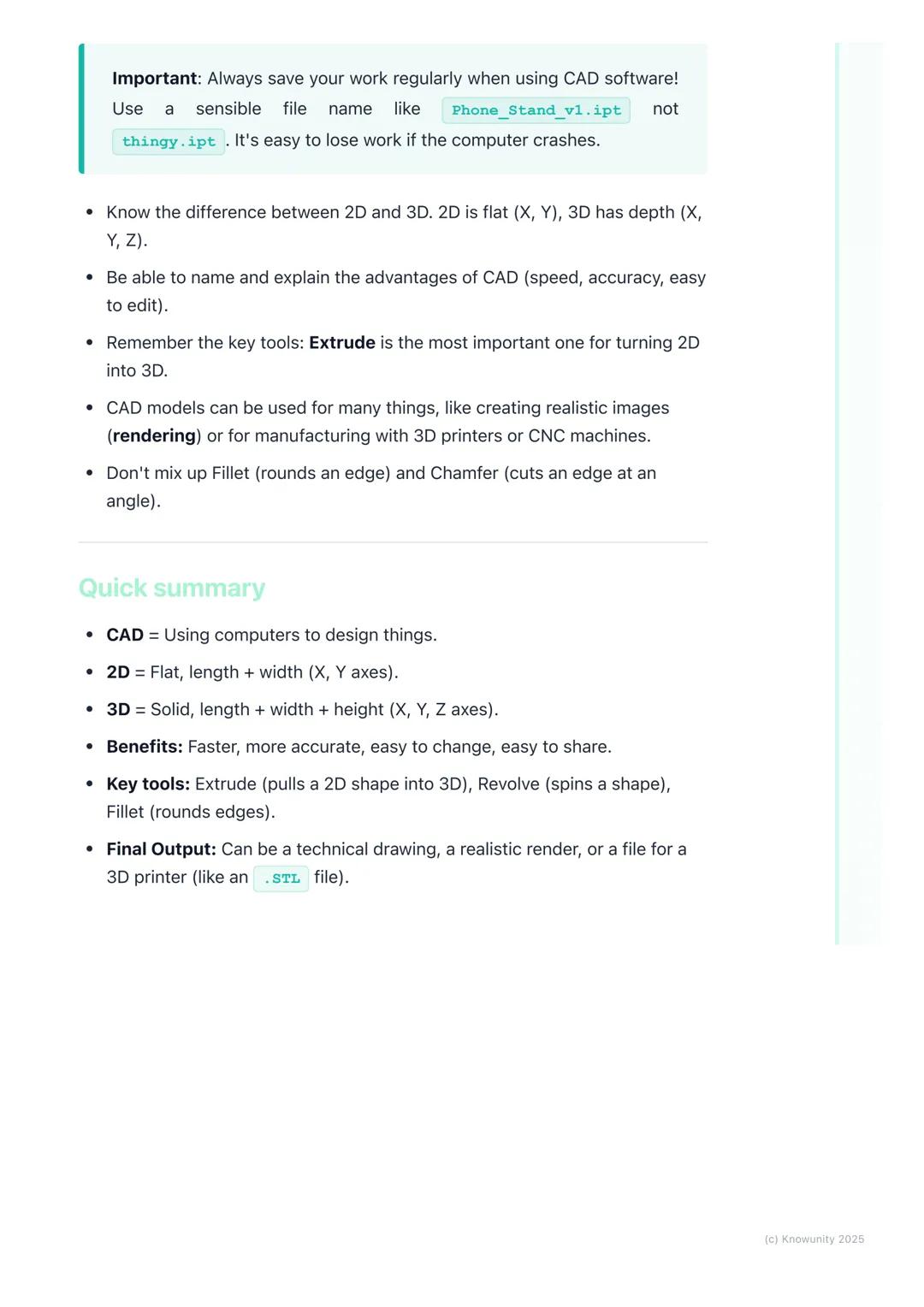
Here's what you absolutely must remember: 2D uses X and Y axes (flat), 3D adds the Z-axis . The main advantages of CAD are speed, accuracy, easy editing, and instant sharing capabilities.
Extrude is your most important tool - it transforms any 2D sketch into a 3D object by adding height. Don't confuse fillet (rounds edges) with chamfer (angled cuts) - they're completely different operations.
Your CAD models can become realistic images through rendering, physical objects via 3D printing, or technical drawings for manufacturing. The versatility is what makes CAD so powerful in modern design work.
Quick memory tricks: 2D = flat like paper, 3D = solid like objects around you. Extrude = pull up, Revolve = spin around, Boolean = combine or subtract shapes.
Final Reminder: CAD isn't just about knowing the tools - it's about thinking in 3D and breaking complex objects down into simple, manageable shapes.
Ang aming AI Companion ay isang AI tool na nakatuon sa mga estudyante na nag-aalok ng higit pa sa mga sagot lang. Binuo mula sa milyong Knowunity resources, nagbibigay ito ng may-kaugnayang impormasyon, personalized na study plans, quizzes, at content direkta sa chat, na umaangkop sa iyong sariling learning journey.
Maaari mong i-download ang app mula sa Google Play Store at Apple App Store.
Tama 'yan! Mag-enjoy sa libreng access sa mga study content, makipag-connect sa kapwa mga estudyante, at kumuha ng instant na tulong – lahat nasa iyong daliri lang.
App Store
Google Play
Napakadaling gamitin at maganda ang disenyo ng app. Nahanap ko lahat ng hinahanap ko hanggang ngayon at natuto ako ng marami mula sa mga presentasyon! Tiyak na gagamitin ko ang app para sa isang takdang-aralin sa klase! At siyempre, nakakatulong din ito bilang inspirasyon.
Stefan S
gumagamit ng iOS
Sobrang ganda talaga ng app na ito. Maraming mga study notes at tulong [...]. Ang problemang subject ko ay Pranses, halimbawa, at ang app ay may maraming options para tumulong. Salamat sa app na ito, bumuti ang Pranses ko. Irerekumenda ko ito sa lahat.
Samantha Klich
Android user
Wow, talagang namangha ako. Sinubukan ko lang ang app dahil nakita ko itong ina-advertise nang maraming beses at sobrang nagulat ako. Ang app na ito ang TULONG na gusto mo para sa paaralan at higit sa lahat, nag-aalok ito ng maraming bagay, tulad ng workouts at fact sheets, na SOBRANG nakatulong sa akin.
Anna
iOS user
Pinakamagandang app sa mundo! walang masabi dahil sobrang ganda nito
Thomas R
iOS user
Napakaganda talaga. Nakakapag-review ako ng 10x mas mabuti, itong app ay mabilis na 10/10. Lubos kong inirerekomenda ito sa lahat. Pwede akong manood at maghanap ng notes. Pwede kong i-save ang mga ito sa subject folder. Pwede kong i-review anumang oras kapag bumalik ako. Kung hindi mo pa nasubukan ang app na ito, marami kang nawawala.
Basil
Android user
Ang app na ito ay nagpapalakas ng loob ko sa paghahanda sa exams, hindi lang dahil sa pagpapataas ng aking kumpiyansa sa sarili sa pamamagitan ng mga feature na nagpapahintulot sa iyo na makipag-connect sa iba at mabawasan ang pakiramdam na nag-iisa, kundi pati na rin sa paraan na nakatuon ang app sa pagpapagaan ng iyong pakiramdam. Madali itong i-navigate, masaya gamitin, at nakakatulong sa sinumang nahihirapan sa kahit anong paraan.
David K
iOS user
Sobrang galing ng app! Ilalagay ko lang ang paksa sa search bar at makakakuha na ako ng sagot kaagad. Hindi ko kailangang manood ng 10 YouTube videos para maintindihan ang isang bagay, kaya nakakatipid ako ng oras. Lubos na inirerekomenda!
Sudenaz Ocak
Android user
Sa paaralan, napakahina ko sa math pero salamat sa app, mas mahusay na ako ngayon. Lubos akong nagpapasalamat na ginawa niyo ang app na ito.
Greenlight Bonnie
Android user
napakareliable na app para tumulong at palawakin ang iyong mga ideya sa Math, English at iba pang mga related na paksa sa iyong mga gawain. gamitin mo ang app na ito kung nahihirapan ka sa mga area, susi ito para diyan. sana nag-review na ako dati. at libre rin ito kaya huwag mag-alala tungkol diyan.
Rohan U
Android user
Alam kong maraming apps gumagamit ng fake accounts para mapataas ang kanilang reviews pero ang app na ito ay deserve lahat ng papuri. Dati nakakakuha ako ng 4 sa aking English exams at ngayon nakakuha ako ng grade 7. Hindi ko pa alam ang app na ito tatlong araw bago ang exam at nakatulong ito ng SOBRA. Pakisuyong maniwala sa akin at gamitin ito dahil sigurado akong makikita mo rin ang mga pagbabago.
Xander S
iOS user
ANG MGA quiz AT flashcard SOBRANG HELPFUL AT I LOVE TALAGA SI Knowunity AI. PARANG CHATGPT LANG PERO MAS MATALINO!! NAKATULONG DIN SA MGA MASCARA PROBLEMS KO!! PATI NA RIN SA MGA TUNAY KONG subject! SYEMPRE 😍😁😲🤑💗✨🎀😮
Elisha
iOS user
Grabe talaga ang app na to. Sobrang nakakaboring sakin ang pagreview pero ginagawa ng app na to na sobrang dali mag-organize ng lahat at pwede mong tanungin ang libreng ai para subukin ang sarili mo kaya sobrang buti at madali mong ma-upload ang sarili mong mga bagay. highly recommend bilang isang taong nagte-take ng mocks ngayon
Paul T
iOS user
Napakadaling gamitin at maganda ang disenyo ng app. Nahanap ko lahat ng hinahanap ko hanggang ngayon at natuto ako ng marami mula sa mga presentasyon! Tiyak na gagamitin ko ang app para sa isang takdang-aralin sa klase! At siyempre, nakakatulong din ito bilang inspirasyon.
Stefan S
gumagamit ng iOS
Sobrang ganda talaga ng app na ito. Maraming mga study notes at tulong [...]. Ang problemang subject ko ay Pranses, halimbawa, at ang app ay may maraming options para tumulong. Salamat sa app na ito, bumuti ang Pranses ko. Irerekumenda ko ito sa lahat.
Samantha Klich
Android user
Wow, talagang namangha ako. Sinubukan ko lang ang app dahil nakita ko itong ina-advertise nang maraming beses at sobrang nagulat ako. Ang app na ito ang TULONG na gusto mo para sa paaralan at higit sa lahat, nag-aalok ito ng maraming bagay, tulad ng workouts at fact sheets, na SOBRANG nakatulong sa akin.
Anna
iOS user
Pinakamagandang app sa mundo! walang masabi dahil sobrang ganda nito
Thomas R
iOS user
Napakaganda talaga. Nakakapag-review ako ng 10x mas mabuti, itong app ay mabilis na 10/10. Lubos kong inirerekomenda ito sa lahat. Pwede akong manood at maghanap ng notes. Pwede kong i-save ang mga ito sa subject folder. Pwede kong i-review anumang oras kapag bumalik ako. Kung hindi mo pa nasubukan ang app na ito, marami kang nawawala.
Basil
Android user
Ang app na ito ay nagpapalakas ng loob ko sa paghahanda sa exams, hindi lang dahil sa pagpapataas ng aking kumpiyansa sa sarili sa pamamagitan ng mga feature na nagpapahintulot sa iyo na makipag-connect sa iba at mabawasan ang pakiramdam na nag-iisa, kundi pati na rin sa paraan na nakatuon ang app sa pagpapagaan ng iyong pakiramdam. Madali itong i-navigate, masaya gamitin, at nakakatulong sa sinumang nahihirapan sa kahit anong paraan.
David K
iOS user
Sobrang galing ng app! Ilalagay ko lang ang paksa sa search bar at makakakuha na ako ng sagot kaagad. Hindi ko kailangang manood ng 10 YouTube videos para maintindihan ang isang bagay, kaya nakakatipid ako ng oras. Lubos na inirerekomenda!
Sudenaz Ocak
Android user
Sa paaralan, napakahina ko sa math pero salamat sa app, mas mahusay na ako ngayon. Lubos akong nagpapasalamat na ginawa niyo ang app na ito.
Greenlight Bonnie
Android user
napakareliable na app para tumulong at palawakin ang iyong mga ideya sa Math, English at iba pang mga related na paksa sa iyong mga gawain. gamitin mo ang app na ito kung nahihirapan ka sa mga area, susi ito para diyan. sana nag-review na ako dati. at libre rin ito kaya huwag mag-alala tungkol diyan.
Rohan U
Android user
Alam kong maraming apps gumagamit ng fake accounts para mapataas ang kanilang reviews pero ang app na ito ay deserve lahat ng papuri. Dati nakakakuha ako ng 4 sa aking English exams at ngayon nakakuha ako ng grade 7. Hindi ko pa alam ang app na ito tatlong araw bago ang exam at nakatulong ito ng SOBRA. Pakisuyong maniwala sa akin at gamitin ito dahil sigurado akong makikita mo rin ang mga pagbabago.
Xander S
iOS user
ANG MGA quiz AT flashcard SOBRANG HELPFUL AT I LOVE TALAGA SI Knowunity AI. PARANG CHATGPT LANG PERO MAS MATALINO!! NAKATULONG DIN SA MGA MASCARA PROBLEMS KO!! PATI NA RIN SA MGA TUNAY KONG subject! SYEMPRE 😍😁😲🤑💗✨🎀😮
Elisha
iOS user
Grabe talaga ang app na to. Sobrang nakakaboring sakin ang pagreview pero ginagawa ng app na to na sobrang dali mag-organize ng lahat at pwede mong tanungin ang libreng ai para subukin ang sarili mo kaya sobrang buti at madali mong ma-upload ang sarili mong mga bagay. highly recommend bilang isang taong nagte-take ng mocks ngayon
Paul T
iOS user
Ever wondered how your phone, gaming console, or even your house was designed before being built? Computer-Aided Design (CAD)is the digital tool that makes it all possible. Instead of sketching with pencil and paper like traditional Technical Graphics, designers... Ipakita pa
Access sa lahat ng dokumento
Pagbutihin ang iyong mga grado
Sumali sa milyong mga estudyante
Think of CAD as your digital drawing board, but way more powerful than anything you could imagine. Computer-Aided Design lets engineers, architects, and designers create incredibly precise 2D drawings and 3D models using specialised software.
The beauty of CAD lies in its versatility. You can design a phone case one day and help plan a skyscraper the next. It's revolutionised how we create things because it's faster, more accurate, and infinitely easier to modify than traditional hand-drawing methods.
Key terms you'll need: A 2D design is flat with just length and width (X and Y axes), like a floor plan. A 3D model adds depth or height , creating solid objects you can view from any angle. Rendering transforms your basic 3D model into a photorealistic image with proper lighting and textures.
Quick Tip: Remember that orthographic projection - those front, top, and side views from traditional TG - can be generated automatically in CAD software!
Access sa lahat ng dokumento
Pagbutihin ang iyong mga grado
Sumali sa milyong mga estudyante
2D CAD works like an incredibly precise electronic drawing board. You'll use commands to draw lines, circles, and arcs with perfect measurements that the software tracks for you. It's brilliant for creating floor plans, circuit diagrams, or profiles for laser cutting.
3D CAD is where things get exciting - you're essentially digital sculpting! Most 3D work starts with a 2D sketch that you then transform into a solid object by giving it depth. Remember the three axes: X-axis (width), Y-axis (depth), and Z-axis (height).
The most important 3D tool is extrude - it takes any flat 2D shape and pulls it up to create height, turning a circle into a cylinder or a square into a cube. Revolve spins a 2D shape around an axis (imagine spinning a semicircle to create a sphere).
Remember: Understanding these axes is crucial - they're the foundation of all 3D modelling work you'll do.
Access sa lahat ng dokumento
Pagbutihin ang iyong mga grado
Sumali sa milyong mga estudyante
Once you've got your basic 3D shape, you'll need tools to refine it. Fillet rounds off sharp edges to make objects look smoother and safer, while chamfer cuts edges at an angle for a bevelled look.
Boolean operations are your shape-combining superpowers. Union fuses multiple shapes into one object - perfect for building complex designs from simple parts. Subtract uses one shape to cut holes in another, whilst intersect keeps only the overlapping parts of two shapes.
These tools might seem basic, but they're the building blocks of every complex CAD model you'll ever see. Master these fundamentals, and you'll be amazed at what you can create.
Pro Tip: Boolean operations are like digital Lego - you can build incredibly complex objects by cleverly combining simple shapes!
Access sa lahat ng dokumento
Pagbutihin ang iyong mga grado
Sumali sa milyong mga estudyante
Let's be honest - CAD absolutely destroys traditional pencil-and-paper drawing in almost every way that matters. Speed? CAD wins - you can create perfect lines and shapes instantly. Accuracy? The computer handles all measurements, eliminating human error completely.
Making changes is where CAD truly shines. Messed up a dimension in traditional drawing? Start over. In CAD? Just click, edit, and you're done. Need to move an entire section? Drag and drop. Want to try a different design approach? Save a copy and experiment freely.
Storage and sharing are game-changers too. Physical drawings take up space, can be damaged, and sharing means photocopying or scanning. Digital CAD files can be stored forever, backed up easily, and shared instantly with anyone worldwide.
Real Talk: While traditional drawing skills are still valuable, CAD is what you'll actually use in most design careers.
Access sa lahat ng dokumento
Pagbutihin ang iyong mga grado
Sumali sa milyong mga estudyante
Let's design something you'd actually want - a personalised keyring using TinkerCAD. Start by dragging a box shape onto the workspace and resize it to 50mm long, 20mm wide, and 3mm thick.
Add your name using the text tool, then decide: do you want it raised (embossed) or carved in (engraved)? For engraving, change the text to a 'hole' and group it with the base - this subtracts the letters, creating carved text.
Create the key hole by adding a cylinder, making it a 'hole', and positioning it at one end. Finally, select everything and hit 'Group' to combine all elements into one finished object.
For a phone stand project, you'd build it from three basic rectangles: a base, an angled back support (use the rotate tool), and a small lip at the front to prevent sliding. Group them together and use fillet to smooth any sharp edges.
Success Strategy: Always save regularly with clear filenames like 'Keyring_v2.stl' - not 'random_thing.file'!
Access sa lahat ng dokumento
Pagbutihin ang iyong mga grado
Sumali sa milyong mga estudyante
Here's what you absolutely must remember: 2D uses X and Y axes (flat), 3D adds the Z-axis . The main advantages of CAD are speed, accuracy, easy editing, and instant sharing capabilities.
Extrude is your most important tool - it transforms any 2D sketch into a 3D object by adding height. Don't confuse fillet (rounds edges) with chamfer (angled cuts) - they're completely different operations.
Your CAD models can become realistic images through rendering, physical objects via 3D printing, or technical drawings for manufacturing. The versatility is what makes CAD so powerful in modern design work.
Quick memory tricks: 2D = flat like paper, 3D = solid like objects around you. Extrude = pull up, Revolve = spin around, Boolean = combine or subtract shapes.
Final Reminder: CAD isn't just about knowing the tools - it's about thinking in 3D and breaking complex objects down into simple, manageable shapes.
Ang aming AI Companion ay isang AI tool na nakatuon sa mga estudyante na nag-aalok ng higit pa sa mga sagot lang. Binuo mula sa milyong Knowunity resources, nagbibigay ito ng may-kaugnayang impormasyon, personalized na study plans, quizzes, at content direkta sa chat, na umaangkop sa iyong sariling learning journey.
Maaari mong i-download ang app mula sa Google Play Store at Apple App Store.
Tama 'yan! Mag-enjoy sa libreng access sa mga study content, makipag-connect sa kapwa mga estudyante, at kumuha ng instant na tulong – lahat nasa iyong daliri lang.
0
Smart Tools NEW
I-transform ang note na ito sa: ✓ 50+ Practice Questions ✓ Interactive Flashcards ✓ Full Mock Exam ✓ Essay Outlines
App Store
Google Play
Napakadaling gamitin at maganda ang disenyo ng app. Nahanap ko lahat ng hinahanap ko hanggang ngayon at natuto ako ng marami mula sa mga presentasyon! Tiyak na gagamitin ko ang app para sa isang takdang-aralin sa klase! At siyempre, nakakatulong din ito bilang inspirasyon.
Stefan S
gumagamit ng iOS
Sobrang ganda talaga ng app na ito. Maraming mga study notes at tulong [...]. Ang problemang subject ko ay Pranses, halimbawa, at ang app ay may maraming options para tumulong. Salamat sa app na ito, bumuti ang Pranses ko. Irerekumenda ko ito sa lahat.
Samantha Klich
Android user
Wow, talagang namangha ako. Sinubukan ko lang ang app dahil nakita ko itong ina-advertise nang maraming beses at sobrang nagulat ako. Ang app na ito ang TULONG na gusto mo para sa paaralan at higit sa lahat, nag-aalok ito ng maraming bagay, tulad ng workouts at fact sheets, na SOBRANG nakatulong sa akin.
Anna
iOS user
Pinakamagandang app sa mundo! walang masabi dahil sobrang ganda nito
Thomas R
iOS user
Napakaganda talaga. Nakakapag-review ako ng 10x mas mabuti, itong app ay mabilis na 10/10. Lubos kong inirerekomenda ito sa lahat. Pwede akong manood at maghanap ng notes. Pwede kong i-save ang mga ito sa subject folder. Pwede kong i-review anumang oras kapag bumalik ako. Kung hindi mo pa nasubukan ang app na ito, marami kang nawawala.
Basil
Android user
Ang app na ito ay nagpapalakas ng loob ko sa paghahanda sa exams, hindi lang dahil sa pagpapataas ng aking kumpiyansa sa sarili sa pamamagitan ng mga feature na nagpapahintulot sa iyo na makipag-connect sa iba at mabawasan ang pakiramdam na nag-iisa, kundi pati na rin sa paraan na nakatuon ang app sa pagpapagaan ng iyong pakiramdam. Madali itong i-navigate, masaya gamitin, at nakakatulong sa sinumang nahihirapan sa kahit anong paraan.
David K
iOS user
Sobrang galing ng app! Ilalagay ko lang ang paksa sa search bar at makakakuha na ako ng sagot kaagad. Hindi ko kailangang manood ng 10 YouTube videos para maintindihan ang isang bagay, kaya nakakatipid ako ng oras. Lubos na inirerekomenda!
Sudenaz Ocak
Android user
Sa paaralan, napakahina ko sa math pero salamat sa app, mas mahusay na ako ngayon. Lubos akong nagpapasalamat na ginawa niyo ang app na ito.
Greenlight Bonnie
Android user
napakareliable na app para tumulong at palawakin ang iyong mga ideya sa Math, English at iba pang mga related na paksa sa iyong mga gawain. gamitin mo ang app na ito kung nahihirapan ka sa mga area, susi ito para diyan. sana nag-review na ako dati. at libre rin ito kaya huwag mag-alala tungkol diyan.
Rohan U
Android user
Alam kong maraming apps gumagamit ng fake accounts para mapataas ang kanilang reviews pero ang app na ito ay deserve lahat ng papuri. Dati nakakakuha ako ng 4 sa aking English exams at ngayon nakakuha ako ng grade 7. Hindi ko pa alam ang app na ito tatlong araw bago ang exam at nakatulong ito ng SOBRA. Pakisuyong maniwala sa akin at gamitin ito dahil sigurado akong makikita mo rin ang mga pagbabago.
Xander S
iOS user
ANG MGA quiz AT flashcard SOBRANG HELPFUL AT I LOVE TALAGA SI Knowunity AI. PARANG CHATGPT LANG PERO MAS MATALINO!! NAKATULONG DIN SA MGA MASCARA PROBLEMS KO!! PATI NA RIN SA MGA TUNAY KONG subject! SYEMPRE 😍😁😲🤑💗✨🎀😮
Elisha
iOS user
Grabe talaga ang app na to. Sobrang nakakaboring sakin ang pagreview pero ginagawa ng app na to na sobrang dali mag-organize ng lahat at pwede mong tanungin ang libreng ai para subukin ang sarili mo kaya sobrang buti at madali mong ma-upload ang sarili mong mga bagay. highly recommend bilang isang taong nagte-take ng mocks ngayon
Paul T
iOS user
Napakadaling gamitin at maganda ang disenyo ng app. Nahanap ko lahat ng hinahanap ko hanggang ngayon at natuto ako ng marami mula sa mga presentasyon! Tiyak na gagamitin ko ang app para sa isang takdang-aralin sa klase! At siyempre, nakakatulong din ito bilang inspirasyon.
Stefan S
gumagamit ng iOS
Sobrang ganda talaga ng app na ito. Maraming mga study notes at tulong [...]. Ang problemang subject ko ay Pranses, halimbawa, at ang app ay may maraming options para tumulong. Salamat sa app na ito, bumuti ang Pranses ko. Irerekumenda ko ito sa lahat.
Samantha Klich
Android user
Wow, talagang namangha ako. Sinubukan ko lang ang app dahil nakita ko itong ina-advertise nang maraming beses at sobrang nagulat ako. Ang app na ito ang TULONG na gusto mo para sa paaralan at higit sa lahat, nag-aalok ito ng maraming bagay, tulad ng workouts at fact sheets, na SOBRANG nakatulong sa akin.
Anna
iOS user
Pinakamagandang app sa mundo! walang masabi dahil sobrang ganda nito
Thomas R
iOS user
Napakaganda talaga. Nakakapag-review ako ng 10x mas mabuti, itong app ay mabilis na 10/10. Lubos kong inirerekomenda ito sa lahat. Pwede akong manood at maghanap ng notes. Pwede kong i-save ang mga ito sa subject folder. Pwede kong i-review anumang oras kapag bumalik ako. Kung hindi mo pa nasubukan ang app na ito, marami kang nawawala.
Basil
Android user
Ang app na ito ay nagpapalakas ng loob ko sa paghahanda sa exams, hindi lang dahil sa pagpapataas ng aking kumpiyansa sa sarili sa pamamagitan ng mga feature na nagpapahintulot sa iyo na makipag-connect sa iba at mabawasan ang pakiramdam na nag-iisa, kundi pati na rin sa paraan na nakatuon ang app sa pagpapagaan ng iyong pakiramdam. Madali itong i-navigate, masaya gamitin, at nakakatulong sa sinumang nahihirapan sa kahit anong paraan.
David K
iOS user
Sobrang galing ng app! Ilalagay ko lang ang paksa sa search bar at makakakuha na ako ng sagot kaagad. Hindi ko kailangang manood ng 10 YouTube videos para maintindihan ang isang bagay, kaya nakakatipid ako ng oras. Lubos na inirerekomenda!
Sudenaz Ocak
Android user
Sa paaralan, napakahina ko sa math pero salamat sa app, mas mahusay na ako ngayon. Lubos akong nagpapasalamat na ginawa niyo ang app na ito.
Greenlight Bonnie
Android user
napakareliable na app para tumulong at palawakin ang iyong mga ideya sa Math, English at iba pang mga related na paksa sa iyong mga gawain. gamitin mo ang app na ito kung nahihirapan ka sa mga area, susi ito para diyan. sana nag-review na ako dati. at libre rin ito kaya huwag mag-alala tungkol diyan.
Rohan U
Android user
Alam kong maraming apps gumagamit ng fake accounts para mapataas ang kanilang reviews pero ang app na ito ay deserve lahat ng papuri. Dati nakakakuha ako ng 4 sa aking English exams at ngayon nakakuha ako ng grade 7. Hindi ko pa alam ang app na ito tatlong araw bago ang exam at nakatulong ito ng SOBRA. Pakisuyong maniwala sa akin at gamitin ito dahil sigurado akong makikita mo rin ang mga pagbabago.
Xander S
iOS user
ANG MGA quiz AT flashcard SOBRANG HELPFUL AT I LOVE TALAGA SI Knowunity AI. PARANG CHATGPT LANG PERO MAS MATALINO!! NAKATULONG DIN SA MGA MASCARA PROBLEMS KO!! PATI NA RIN SA MGA TUNAY KONG subject! SYEMPRE 😍😁😲🤑💗✨🎀😮
Elisha
iOS user
Grabe talaga ang app na to. Sobrang nakakaboring sakin ang pagreview pero ginagawa ng app na to na sobrang dali mag-organize ng lahat at pwede mong tanungin ang libreng ai para subukin ang sarili mo kaya sobrang buti at madali mong ma-upload ang sarili mong mga bagay. highly recommend bilang isang taong nagte-take ng mocks ngayon
Paul T
iOS user