
Ready to tackle your research project? Designing your research topic... Ipakita pa
 Practical Research
 Iba pa
 Science
 Filipino
 Econ
EconMag-sign up para makita ang contentLibre ito!
Access sa lahat ng dokumento
Pagbutihin ang iyong mga grado
Sumali sa milyong mga estudyante
Knowunity AI
Higit pa
Mga Asignatura
Triangle Congruence and Similarity Theorems
Triangle Properties and Classification
Linear Equations and Graphs
Geometric Angle Relationships
Trigonometric Functions and Identities
Equation Solving Techniques
Circle Geometry Fundamentals
Division Operations and Methods
Basic Differentiation Rules
Exponent and Logarithm Properties
Ipakita lahat ng paksa
Human Organ Systems
Reproductive Cell Cycles
Biological Sciences Subdisciplines
Cellular Energy Metabolism
Autotrophic Energy Processes
Inheritance Patterns and Principles
Biomolecular Structure and Organization
Cell Cycle and Division Mechanics
Cellular Organization and Development
Biological Structural Organization
Ipakita lahat ng paksa
Chemical Sciences and Applications
Atomic Structure and Composition
Molecular Electron Structure Representation
Atomic Electron Behavior
Matter Properties and Water
Mole Concept and Calculations
Gas Laws and Behavior
Periodic Table Organization
Chemical Thermodynamics Fundamentals
Chemical Bond Types and Properties
Ipakita lahat ng paksa
European Renaissance and Enlightenment
European Cultural Movements 800-1920
American Revolution Era 1763-1797
American Civil War 1861-1865
Global Imperial Systems
Mongol and Chinese Dynasties
U.S. Presidents and World Leaders
Historical Sources and Documentation
World Wars Era and Impact
World Religious Systems
Ipakita lahat ng paksa
Classic and Contemporary Novels
Literary Character Analysis
Rhetorical Theory and Practice
Classic Literary Narratives
Reading Analysis and Interpretation
Narrative Structure and Techniques
English Language Components
Influential English-Language Authors
Basic Sentence Structure
Narrative Voice and Perspective
Ipakita lahat ng paksa
352
•
Na-update Mar 29, 2026
•
rain
@rainulan12
Ready to tackle your research project? Designing your research topic... Ipakita pa
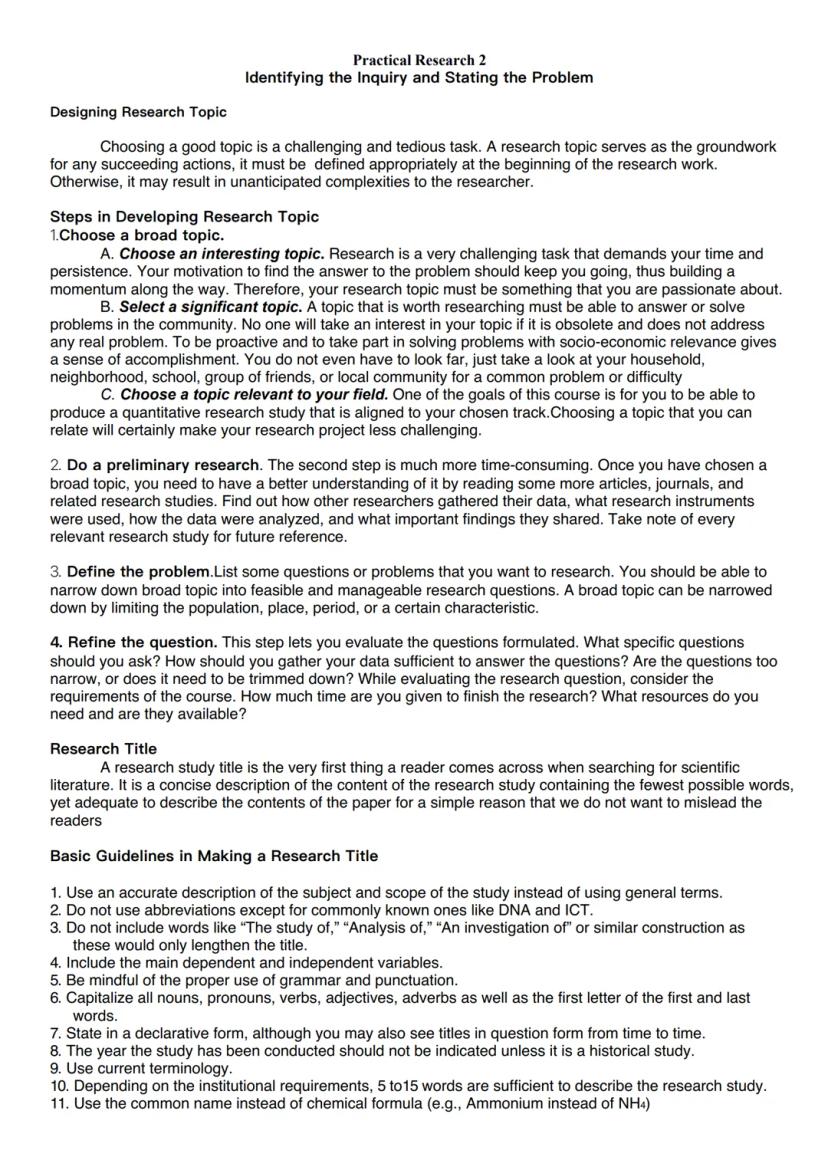
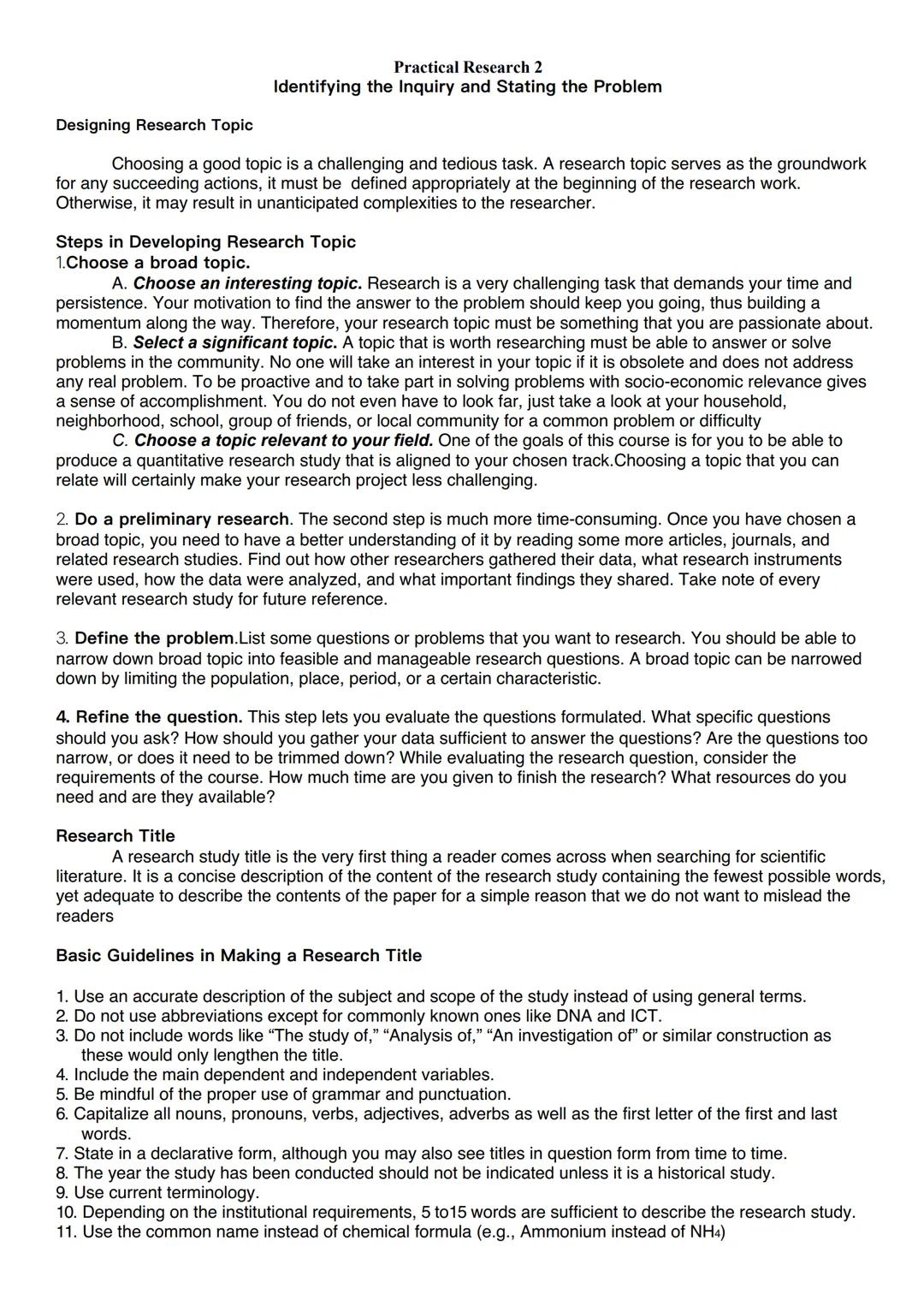
Choosing a good research topic is challenging but crucial for success. Your topic needs to be interesting enough to keep you motivated through the entire research process. Look for topics that genuinely excite you and address real problems in your community or field of study.
To develop a strong research topic, start with a broad area that interests you and is aligned with your academic track. Then narrow it down by conducting preliminary research through articles, journals, and related studies. Pay attention to how other researchers collected and analyzed their data—these will be helpful references later.
Once you have background knowledge, define specific problems you want to solve. The key is making your topic feasible and manageable by limiting factors like population, location, or time period. Evaluate your questions based on available resources and time constraints.
💡 Research Tip: Don't look far for topics! Your household, neighborhood, school, or friend group often contains interesting problems worth researching that you already care about.
When creating your research title, aim for conciseness while fully describing your study. Avoid unnecessary phrases like "An Analysis of..." and include your main variables. Use proper grammar, capitalize appropriately, and keep your title between 5-15 words depending on your school's requirements. A good title accurately describes your research without being overly general or misleading.
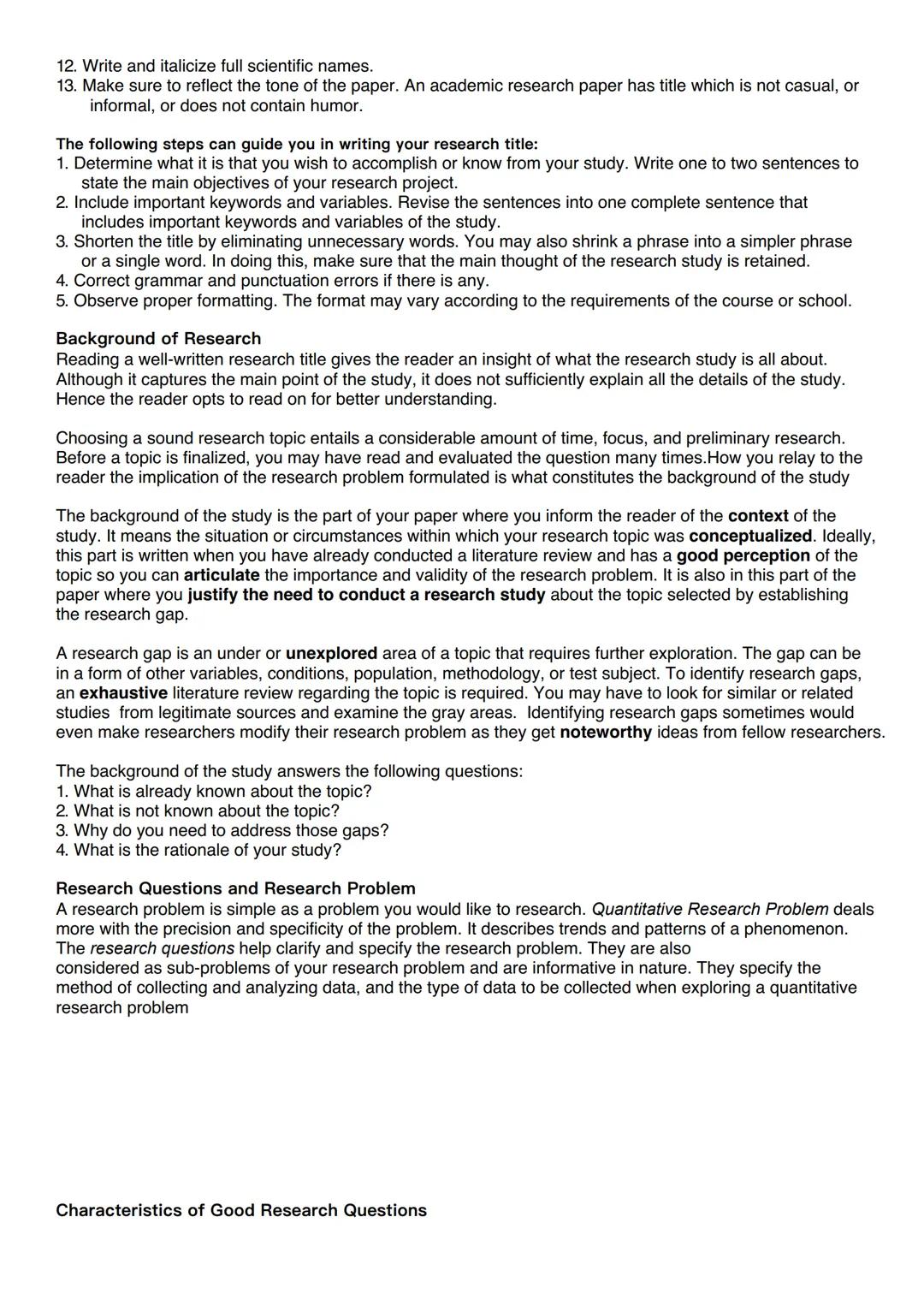
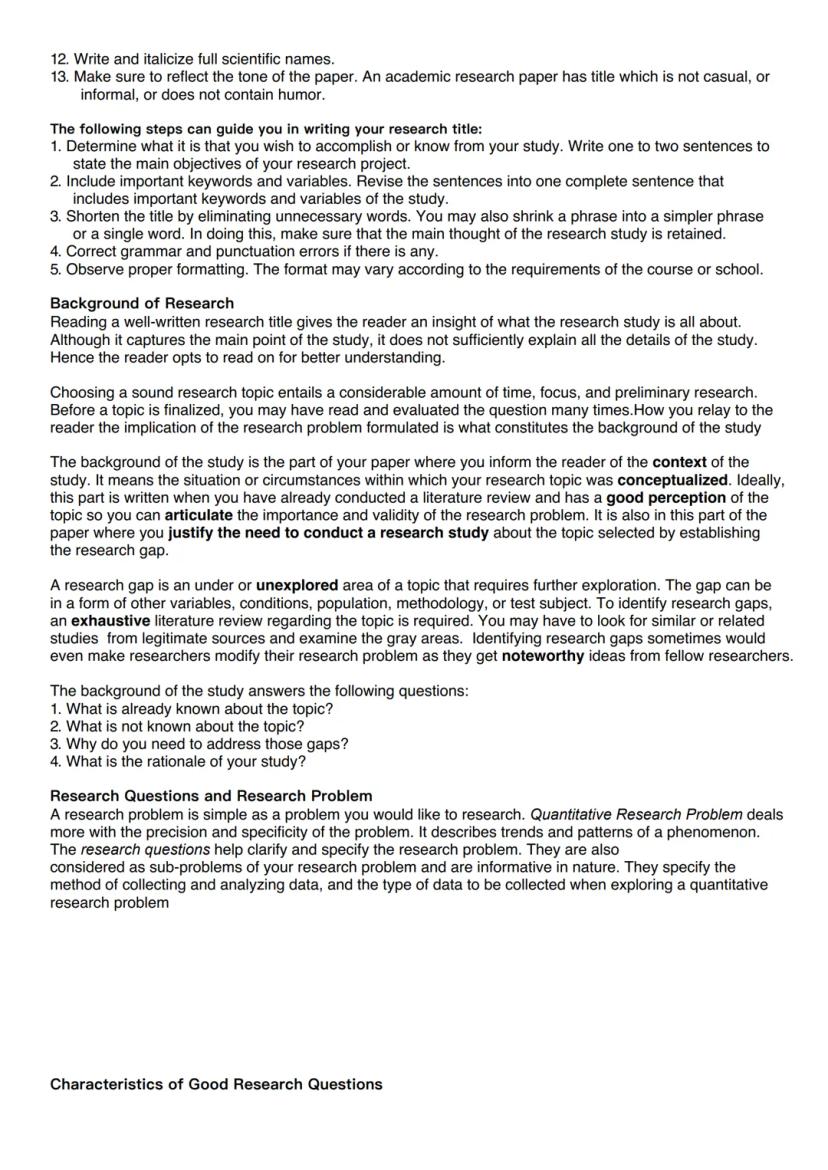
A strong research title grabs attention, but your background section is where you provide context and justification. This section explains why your research matters and how it fits into the existing knowledge landscape. It's your chance to show readers you've done your homework and understand the field.
When writing your background, you'll need to clearly identify the research gap—the unexplored area of your topic that needs investigation. Finding this gap requires thorough literature review to examine what's already known and what remains unclear. Sometimes, discovering these gaps might even lead you to modify your original research problem.
Your background section should address four key questions: What's already known about the topic? What's not known? Why do these gaps need addressing? What's the rationale for your study? Answering these questions helps establish the foundation and purpose of your research.
🔍 Important: The background section is usually written after you've conducted a literature review and developed a solid understanding of your topic. This ensures you can effectively communicate the importance and validity of your research problem.
The right formatting matters too. When finalizing your research title, eliminate unnecessary words while keeping your main keywords and variables. Make sure it reflects the formal tone appropriate for academic research—avoid casual language or humor that might undermine your credibility.
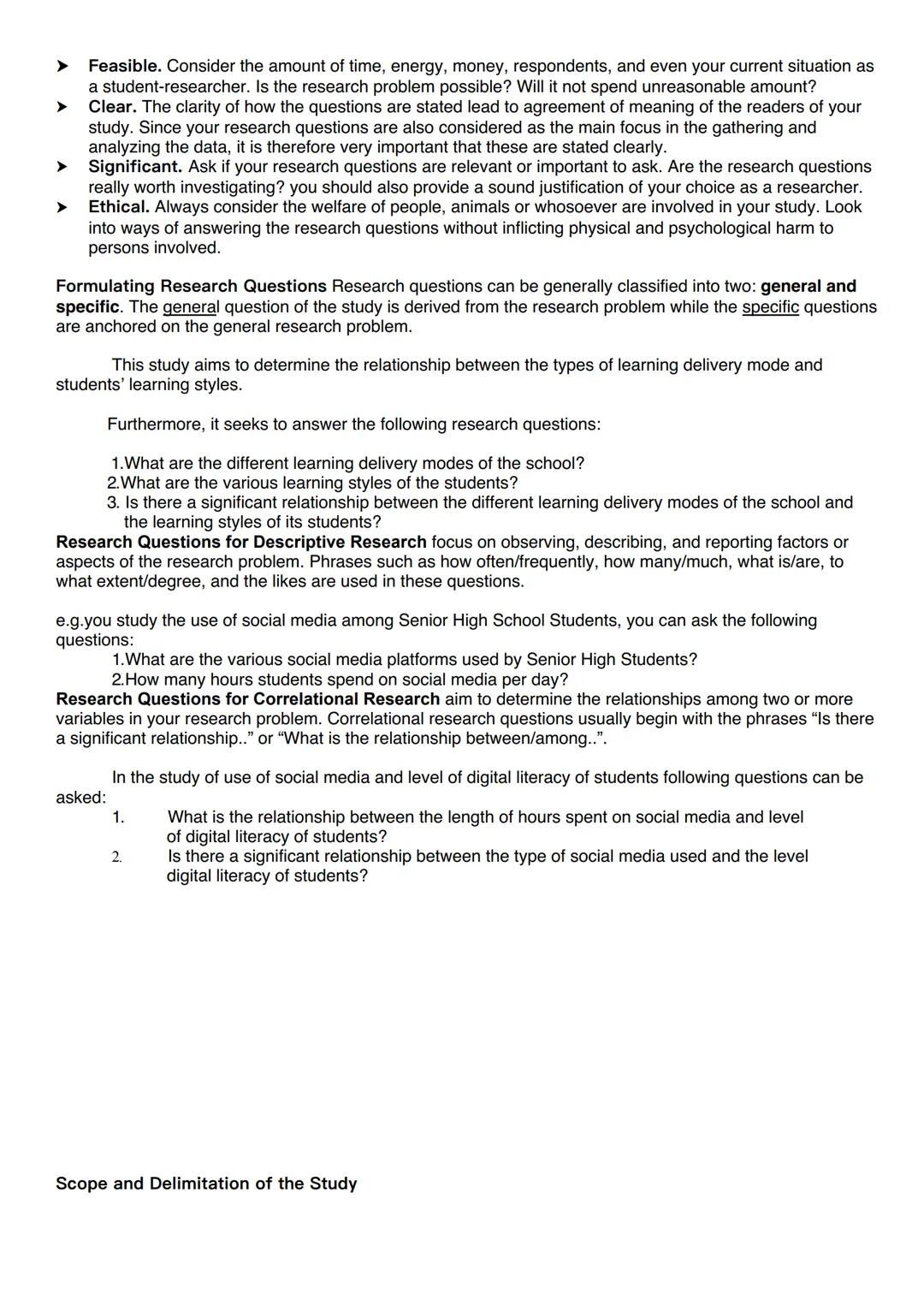
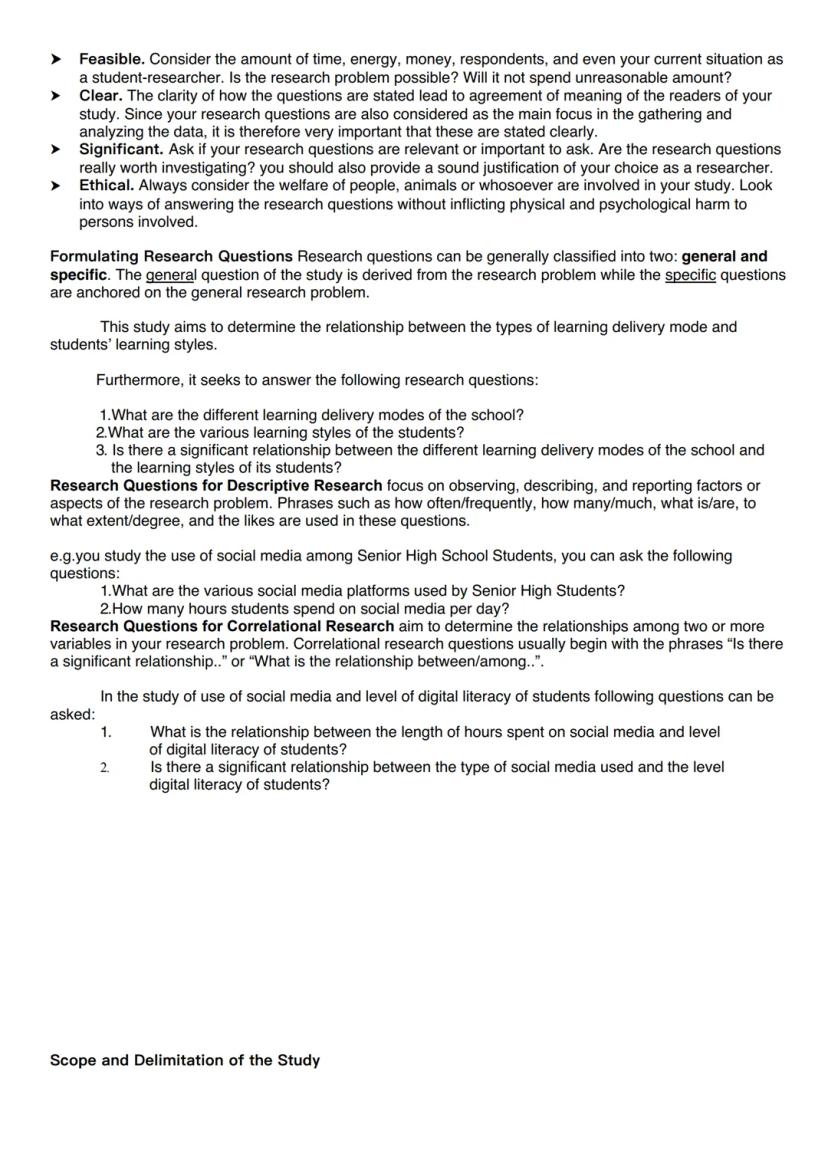
Research questions are the backbone of your study. In quantitative research, they need to be precise and specific, describing patterns or trends of a phenomenon. These questions clarify your research problem and guide your data collection and analysis methods.
Good research questions have four essential qualities. They must be feasible within your time and resource constraints. They need to be clear so readers understand exactly what you're investigating. They should be significant enough to be worth researching. And they must be ethical, ensuring no harm comes to participants in your study.
Research questions generally fall into two categories: general and specific. Your general question comes directly from your research problem, while specific questions break down different aspects you'll investigate. For example, if you're studying learning delivery modes and student learning styles, your specific questions might ask about the types of delivery modes used, the various learning styles present, and whether there's a relationship between them.
📝 Question Formulation Tip: Descriptive research questions use phrases like "how often," "how many," or "to what extent" to focus on describing and reporting aspects of your problem. Correlational research questions typically begin with "Is there a significant relationship..." or "What is the relationship between..."
When writing correlational research questions, you're looking to determine relationships between variables. For instance, if studying social media use and digital literacy, you might ask about the relationship between hours spent on social media and level of digital literacy, or between types of platforms used and literacy levels.
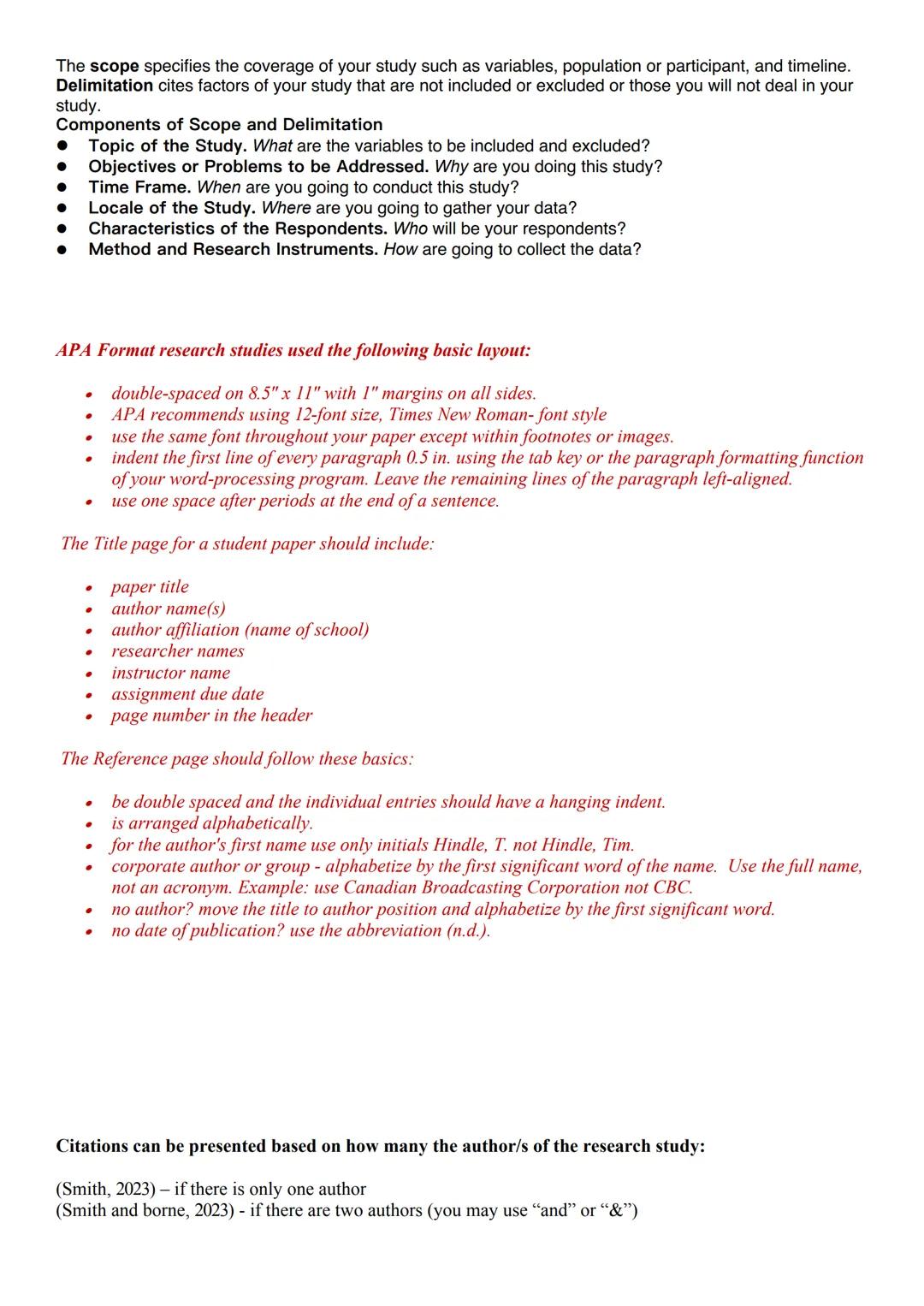
Every research study needs clear boundaries. The scope defines what your study covers, while the delimitation explains what's intentionally excluded. Together, they set realistic expectations about your research.
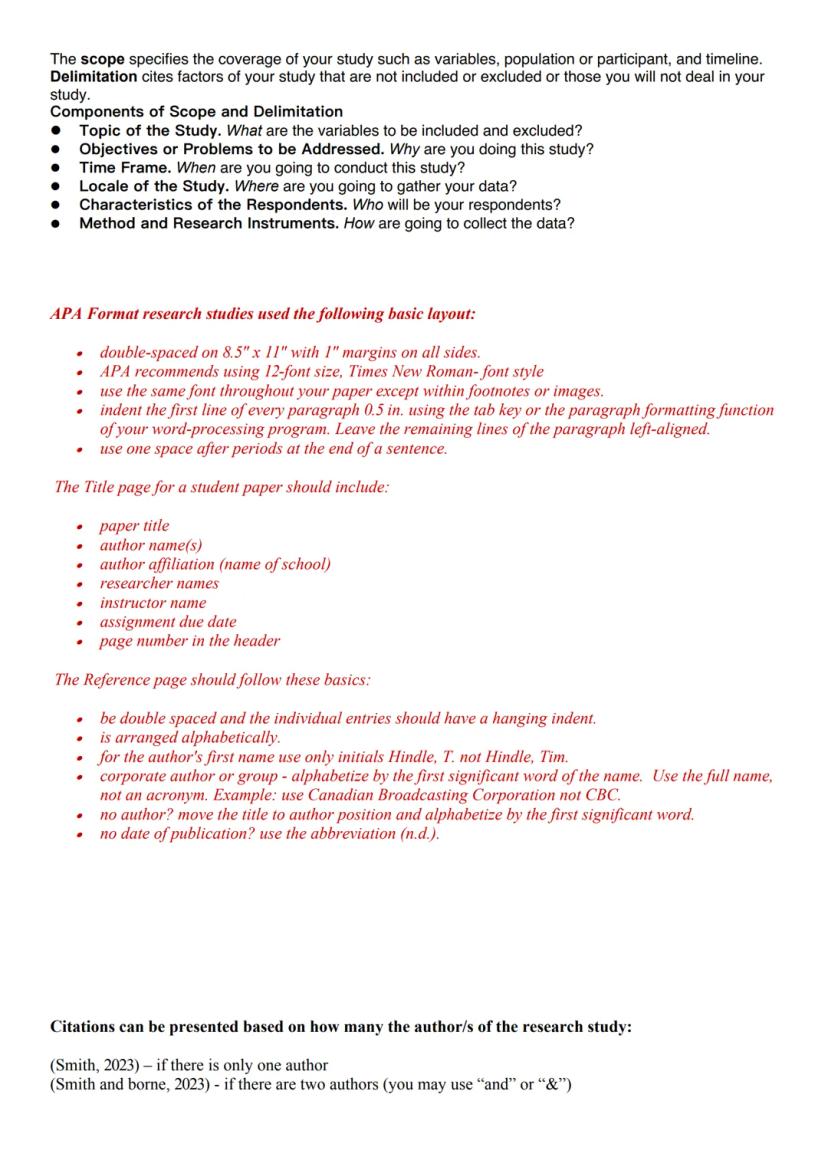
Your scope and delimitation section should address several key components: the topic , objectives (why you're conducting the study), time frame, location, participant characteristics, and research methods. These elements help readers understand exactly what your study does—and doesn't—cover.
For formatting your paper, APA style provides clear guidelines. Use double-spacing on 8.5"×11" paper with 1-inch margins. Choose 12-point Times New Roman font throughout your document. Indent the first line of each paragraph 0.5 inches and use one space after periods. These formatting details might seem minor, but they ensure your paper looks professional.
📄 Format Check: Even brilliant research can be undermined by poor formatting. Following APA guidelines shows attention to detail and helps readers focus on your content rather than being distracted by inconsistent presentation.
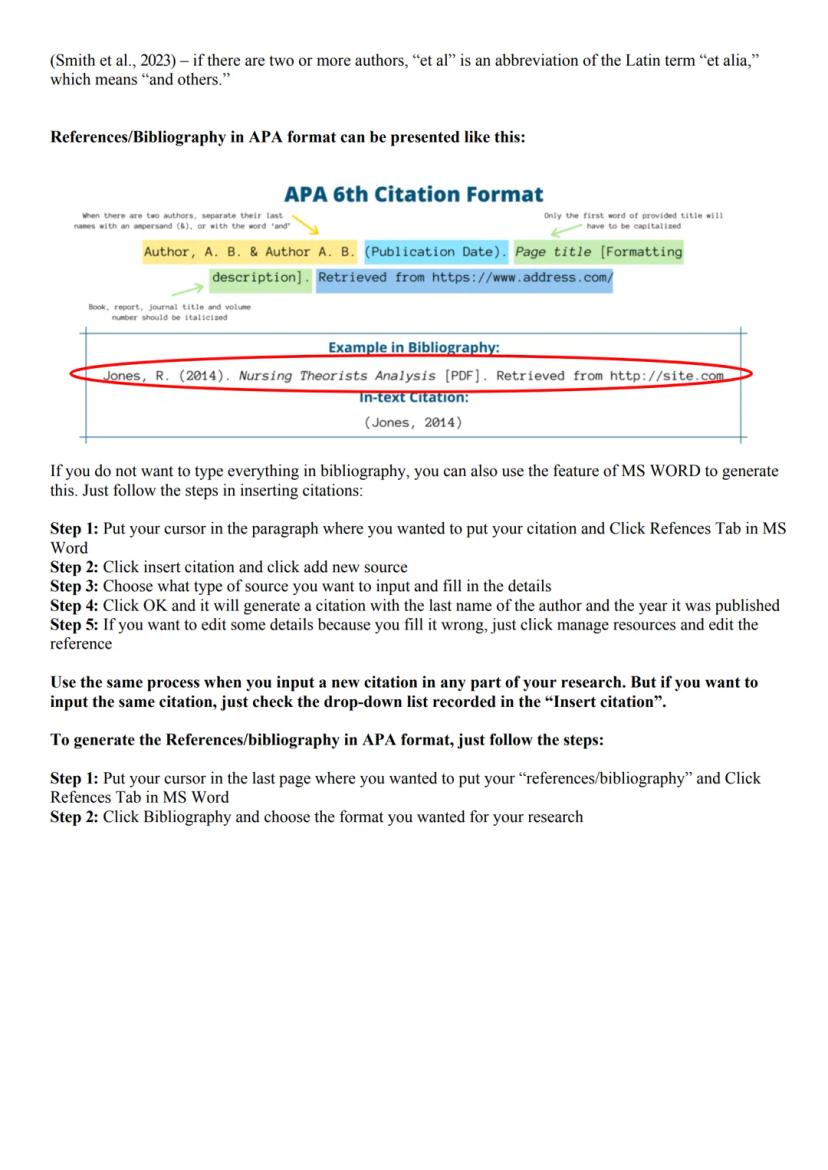
The title page of your paper should include the paper title, author names, school affiliation, instructor name, due date, and page number in the header. Your reference page should be double-spaced with hanging indents for each entry, arranged alphabetically by author's last name. When citing sources with multiple authors, use "et al." for three or more authors (Smith et al., 2023).
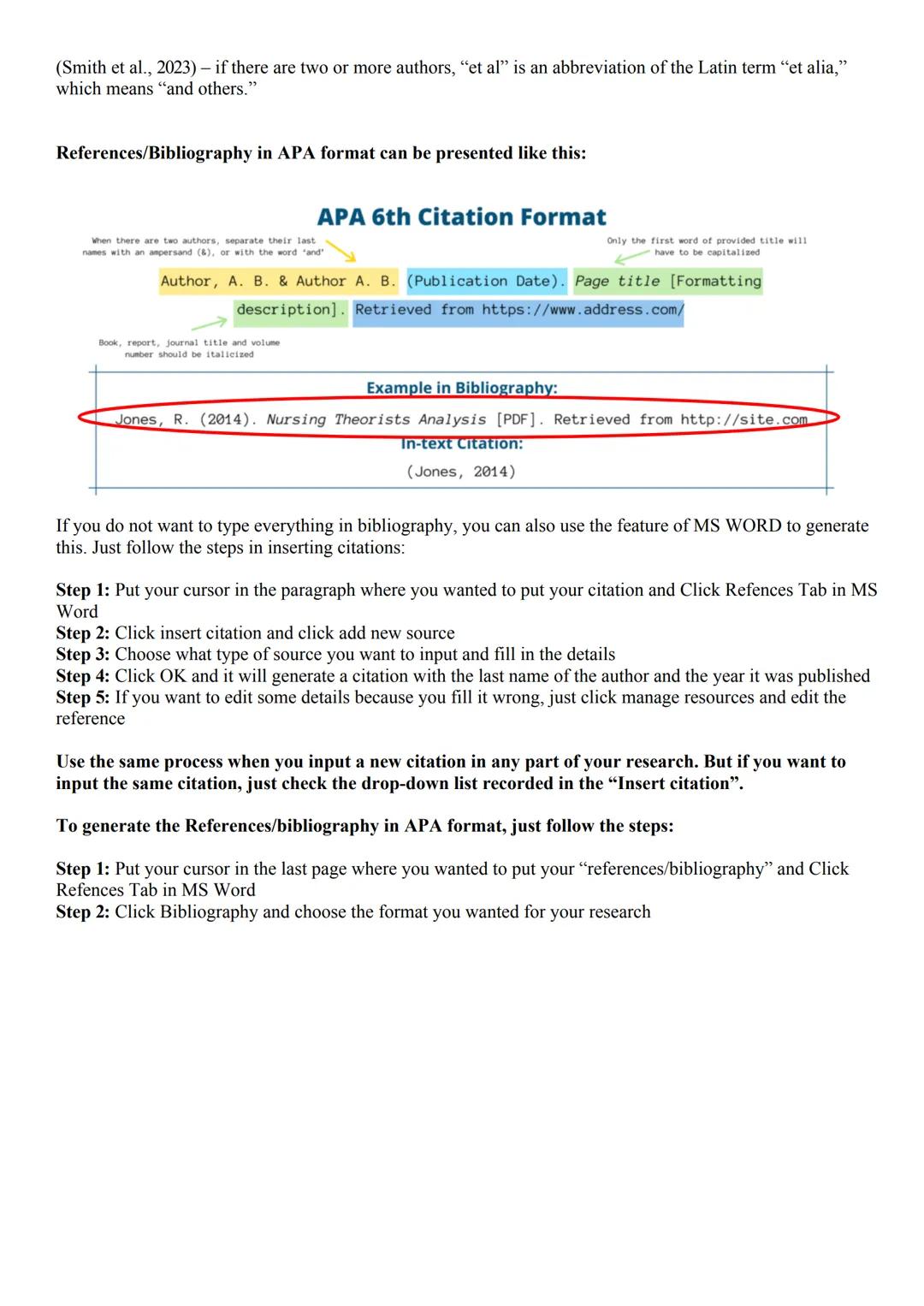
Proper citations show academic honesty and give credit where it's due. In APA format, citations vary based on the number of authors. For one author, use (Smith, 2023); for two authors, use (Smith & Borne, 2023); and for three or more authors, use (Smith et al., 2023).
Your reference list should follow specific formatting rules. Each entry includes the author's name (last name, first initial), publication date, title, and source information. Book titles, journal names, and volume numbers should be italicized. For online sources, include the URL after "Retrieved from."
Creating citations manually can be time-consuming, but MS Word offers a helpful feature to streamline this process. To insert citations, place your cursor where you want the citation, click the References tab, select "Insert Citation," and add a new source. Fill in the required details, click OK, and the citation will appear in the correct format.
⚡ Time-Saving Tip: Once you've entered a source in Word, you can reuse it throughout your paper by selecting it from the dropdown list when you click "Insert Citation." This ensures consistency and saves time.
To generate your complete reference list, place your cursor on a new page at the end of your document, click the References tab, select Bibliography, and choose your preferred format. Word will automatically compile all your citations into a properly formatted reference list. If you need to make changes to any source, use the "Manage Sources" option to edit entries.
Ang aming AI Companion ay isang AI tool na nakatuon sa mga estudyante na nag-aalok ng higit pa sa mga sagot lang. Binuo mula sa milyong Knowunity resources, nagbibigay ito ng may-kaugnayang impormasyon, personalized na study plans, quizzes, at content direkta sa chat, na umaangkop sa iyong sariling learning journey.
Maaari mong i-download ang app mula sa Google Play Store at Apple App Store.
Tama 'yan! Mag-enjoy sa libreng access sa mga study content, makipag-connect sa kapwa mga estudyante, at kumuha ng instant na tulong – lahat nasa iyong daliri lang.
App Store
Google Play
Napakadaling gamitin at maganda ang disenyo ng app. Nahanap ko lahat ng hinahanap ko hanggang ngayon at natuto ako ng marami mula sa mga presentasyon! Tiyak na gagamitin ko ang app para sa isang takdang-aralin sa klase! At siyempre, nakakatulong din ito bilang inspirasyon.
Stefan S
gumagamit ng iOS
Sobrang ganda talaga ng app na ito. Maraming mga study notes at tulong [...]. Ang problemang subject ko ay Pranses, halimbawa, at ang app ay may maraming options para tumulong. Salamat sa app na ito, bumuti ang Pranses ko. Irerekumenda ko ito sa lahat.
Samantha Klich
Android user
Wow, talagang namangha ako. Sinubukan ko lang ang app dahil nakita ko itong ina-advertise nang maraming beses at sobrang nagulat ako. Ang app na ito ang TULONG na gusto mo para sa paaralan at higit sa lahat, nag-aalok ito ng maraming bagay, tulad ng workouts at fact sheets, na SOBRANG nakatulong sa akin.
Anna
iOS user
Pinakamagandang app sa mundo! walang masabi dahil sobrang ganda nito
Thomas R
iOS user
Napakaganda talaga. Nakakapag-review ako ng 10x mas mabuti, itong app ay mabilis na 10/10. Lubos kong inirerekomenda ito sa lahat. Pwede akong manood at maghanap ng notes. Pwede kong i-save ang mga ito sa subject folder. Pwede kong i-review anumang oras kapag bumalik ako. Kung hindi mo pa nasubukan ang app na ito, marami kang nawawala.
Basil
Android user
Ang app na ito ay nagpapalakas ng loob ko sa paghahanda sa exams, hindi lang dahil sa pagpapataas ng aking kumpiyansa sa sarili sa pamamagitan ng mga feature na nagpapahintulot sa iyo na makipag-connect sa iba at mabawasan ang pakiramdam na nag-iisa, kundi pati na rin sa paraan na nakatuon ang app sa pagpapagaan ng iyong pakiramdam. Madali itong i-navigate, masaya gamitin, at nakakatulong sa sinumang nahihirapan sa kahit anong paraan.
David K
iOS user
Sobrang galing ng app! Ilalagay ko lang ang paksa sa search bar at makakakuha na ako ng sagot kaagad. Hindi ko kailangang manood ng 10 YouTube videos para maintindihan ang isang bagay, kaya nakakatipid ako ng oras. Lubos na inirerekomenda!
Sudenaz Ocak
Android user
Sa paaralan, napakahina ko sa math pero salamat sa app, mas mahusay na ako ngayon. Lubos akong nagpapasalamat na ginawa niyo ang app na ito.
Greenlight Bonnie
Android user
napakareliable na app para tumulong at palawakin ang iyong mga ideya sa Math, English at iba pang mga related na paksa sa iyong mga gawain. gamitin mo ang app na ito kung nahihirapan ka sa mga area, susi ito para diyan. sana nag-review na ako dati. at libre rin ito kaya huwag mag-alala tungkol diyan.
Rohan U
Android user
Alam kong maraming apps gumagamit ng fake accounts para mapataas ang kanilang reviews pero ang app na ito ay deserve lahat ng papuri. Dati nakakakuha ako ng 4 sa aking English exams at ngayon nakakuha ako ng grade 7. Hindi ko pa alam ang app na ito tatlong araw bago ang exam at nakatulong ito ng SOBRA. Pakisuyong maniwala sa akin at gamitin ito dahil sigurado akong makikita mo rin ang mga pagbabago.
Xander S
iOS user
ANG MGA quiz AT flashcard SOBRANG HELPFUL AT I LOVE TALAGA SI Knowunity AI. PARANG CHATGPT LANG PERO MAS MATALINO!! NAKATULONG DIN SA MGA MASCARA PROBLEMS KO!! PATI NA RIN SA MGA TUNAY KONG subject! SYEMPRE 😍😁😲🤑💗✨🎀😮
Elisha
iOS user
Grabe talaga ang app na to. Sobrang nakakaboring sakin ang pagreview pero ginagawa ng app na to na sobrang dali mag-organize ng lahat at pwede mong tanungin ang libreng ai para subukin ang sarili mo kaya sobrang buti at madali mong ma-upload ang sarili mong mga bagay. highly recommend bilang isang taong nagte-take ng mocks ngayon
Paul T
iOS user
Napakadaling gamitin at maganda ang disenyo ng app. Nahanap ko lahat ng hinahanap ko hanggang ngayon at natuto ako ng marami mula sa mga presentasyon! Tiyak na gagamitin ko ang app para sa isang takdang-aralin sa klase! At siyempre, nakakatulong din ito bilang inspirasyon.
Stefan S
gumagamit ng iOS
Sobrang ganda talaga ng app na ito. Maraming mga study notes at tulong [...]. Ang problemang subject ko ay Pranses, halimbawa, at ang app ay may maraming options para tumulong. Salamat sa app na ito, bumuti ang Pranses ko. Irerekumenda ko ito sa lahat.
Samantha Klich
Android user
Wow, talagang namangha ako. Sinubukan ko lang ang app dahil nakita ko itong ina-advertise nang maraming beses at sobrang nagulat ako. Ang app na ito ang TULONG na gusto mo para sa paaralan at higit sa lahat, nag-aalok ito ng maraming bagay, tulad ng workouts at fact sheets, na SOBRANG nakatulong sa akin.
Anna
iOS user
Pinakamagandang app sa mundo! walang masabi dahil sobrang ganda nito
Thomas R
iOS user
Napakaganda talaga. Nakakapag-review ako ng 10x mas mabuti, itong app ay mabilis na 10/10. Lubos kong inirerekomenda ito sa lahat. Pwede akong manood at maghanap ng notes. Pwede kong i-save ang mga ito sa subject folder. Pwede kong i-review anumang oras kapag bumalik ako. Kung hindi mo pa nasubukan ang app na ito, marami kang nawawala.
Basil
Android user
Ang app na ito ay nagpapalakas ng loob ko sa paghahanda sa exams, hindi lang dahil sa pagpapataas ng aking kumpiyansa sa sarili sa pamamagitan ng mga feature na nagpapahintulot sa iyo na makipag-connect sa iba at mabawasan ang pakiramdam na nag-iisa, kundi pati na rin sa paraan na nakatuon ang app sa pagpapagaan ng iyong pakiramdam. Madali itong i-navigate, masaya gamitin, at nakakatulong sa sinumang nahihirapan sa kahit anong paraan.
David K
iOS user
Sobrang galing ng app! Ilalagay ko lang ang paksa sa search bar at makakakuha na ako ng sagot kaagad. Hindi ko kailangang manood ng 10 YouTube videos para maintindihan ang isang bagay, kaya nakakatipid ako ng oras. Lubos na inirerekomenda!
Sudenaz Ocak
Android user
Sa paaralan, napakahina ko sa math pero salamat sa app, mas mahusay na ako ngayon. Lubos akong nagpapasalamat na ginawa niyo ang app na ito.
Greenlight Bonnie
Android user
napakareliable na app para tumulong at palawakin ang iyong mga ideya sa Math, English at iba pang mga related na paksa sa iyong mga gawain. gamitin mo ang app na ito kung nahihirapan ka sa mga area, susi ito para diyan. sana nag-review na ako dati. at libre rin ito kaya huwag mag-alala tungkol diyan.
Rohan U
Android user
Alam kong maraming apps gumagamit ng fake accounts para mapataas ang kanilang reviews pero ang app na ito ay deserve lahat ng papuri. Dati nakakakuha ako ng 4 sa aking English exams at ngayon nakakuha ako ng grade 7. Hindi ko pa alam ang app na ito tatlong araw bago ang exam at nakatulong ito ng SOBRA. Pakisuyong maniwala sa akin at gamitin ito dahil sigurado akong makikita mo rin ang mga pagbabago.
Xander S
iOS user
ANG MGA quiz AT flashcard SOBRANG HELPFUL AT I LOVE TALAGA SI Knowunity AI. PARANG CHATGPT LANG PERO MAS MATALINO!! NAKATULONG DIN SA MGA MASCARA PROBLEMS KO!! PATI NA RIN SA MGA TUNAY KONG subject! SYEMPRE 😍😁😲🤑💗✨🎀😮
Elisha
iOS user
Grabe talaga ang app na to. Sobrang nakakaboring sakin ang pagreview pero ginagawa ng app na to na sobrang dali mag-organize ng lahat at pwede mong tanungin ang libreng ai para subukin ang sarili mo kaya sobrang buti at madali mong ma-upload ang sarili mong mga bagay. highly recommend bilang isang taong nagte-take ng mocks ngayon
Paul T
iOS user
rain
@rainulan12
Ready to tackle your research project? Designing your research topic is the foundation of your entire study. Let's explore how to craft a strong research topic, create an effective title, and set up your paper properly. With the right approach,... Ipakita pa
Access sa lahat ng dokumento
Pagbutihin ang iyong mga grado
Sumali sa milyong mga estudyante
Choosing a good research topic is challenging but crucial for success. Your topic needs to be interesting enough to keep you motivated through the entire research process. Look for topics that genuinely excite you and address real problems in your community or field of study.
To develop a strong research topic, start with a broad area that interests you and is aligned with your academic track. Then narrow it down by conducting preliminary research through articles, journals, and related studies. Pay attention to how other researchers collected and analyzed their data—these will be helpful references later.
Once you have background knowledge, define specific problems you want to solve. The key is making your topic feasible and manageable by limiting factors like population, location, or time period. Evaluate your questions based on available resources and time constraints.
💡 Research Tip: Don't look far for topics! Your household, neighborhood, school, or friend group often contains interesting problems worth researching that you already care about.
When creating your research title, aim for conciseness while fully describing your study. Avoid unnecessary phrases like "An Analysis of..." and include your main variables. Use proper grammar, capitalize appropriately, and keep your title between 5-15 words depending on your school's requirements. A good title accurately describes your research without being overly general or misleading.
Access sa lahat ng dokumento
Pagbutihin ang iyong mga grado
Sumali sa milyong mga estudyante
A strong research title grabs attention, but your background section is where you provide context and justification. This section explains why your research matters and how it fits into the existing knowledge landscape. It's your chance to show readers you've done your homework and understand the field.
When writing your background, you'll need to clearly identify the research gap—the unexplored area of your topic that needs investigation. Finding this gap requires thorough literature review to examine what's already known and what remains unclear. Sometimes, discovering these gaps might even lead you to modify your original research problem.
Your background section should address four key questions: What's already known about the topic? What's not known? Why do these gaps need addressing? What's the rationale for your study? Answering these questions helps establish the foundation and purpose of your research.
🔍 Important: The background section is usually written after you've conducted a literature review and developed a solid understanding of your topic. This ensures you can effectively communicate the importance and validity of your research problem.
The right formatting matters too. When finalizing your research title, eliminate unnecessary words while keeping your main keywords and variables. Make sure it reflects the formal tone appropriate for academic research—avoid casual language or humor that might undermine your credibility.
Access sa lahat ng dokumento
Pagbutihin ang iyong mga grado
Sumali sa milyong mga estudyante
Research questions are the backbone of your study. In quantitative research, they need to be precise and specific, describing patterns or trends of a phenomenon. These questions clarify your research problem and guide your data collection and analysis methods.
Good research questions have four essential qualities. They must be feasible within your time and resource constraints. They need to be clear so readers understand exactly what you're investigating. They should be significant enough to be worth researching. And they must be ethical, ensuring no harm comes to participants in your study.
Research questions generally fall into two categories: general and specific. Your general question comes directly from your research problem, while specific questions break down different aspects you'll investigate. For example, if you're studying learning delivery modes and student learning styles, your specific questions might ask about the types of delivery modes used, the various learning styles present, and whether there's a relationship between them.
📝 Question Formulation Tip: Descriptive research questions use phrases like "how often," "how many," or "to what extent" to focus on describing and reporting aspects of your problem. Correlational research questions typically begin with "Is there a significant relationship..." or "What is the relationship between..."
When writing correlational research questions, you're looking to determine relationships between variables. For instance, if studying social media use and digital literacy, you might ask about the relationship between hours spent on social media and level of digital literacy, or between types of platforms used and literacy levels.
Access sa lahat ng dokumento
Pagbutihin ang iyong mga grado
Sumali sa milyong mga estudyante
Every research study needs clear boundaries. The scope defines what your study covers, while the delimitation explains what's intentionally excluded. Together, they set realistic expectations about your research.
Your scope and delimitation section should address several key components: the topic , objectives (why you're conducting the study), time frame, location, participant characteristics, and research methods. These elements help readers understand exactly what your study does—and doesn't—cover.
For formatting your paper, APA style provides clear guidelines. Use double-spacing on 8.5"×11" paper with 1-inch margins. Choose 12-point Times New Roman font throughout your document. Indent the first line of each paragraph 0.5 inches and use one space after periods. These formatting details might seem minor, but they ensure your paper looks professional.
📄 Format Check: Even brilliant research can be undermined by poor formatting. Following APA guidelines shows attention to detail and helps readers focus on your content rather than being distracted by inconsistent presentation.
The title page of your paper should include the paper title, author names, school affiliation, instructor name, due date, and page number in the header. Your reference page should be double-spaced with hanging indents for each entry, arranged alphabetically by author's last name. When citing sources with multiple authors, use "et al." for three or more authors (Smith et al., 2023).
Access sa lahat ng dokumento
Pagbutihin ang iyong mga grado
Sumali sa milyong mga estudyante
Proper citations show academic honesty and give credit where it's due. In APA format, citations vary based on the number of authors. For one author, use (Smith, 2023); for two authors, use (Smith & Borne, 2023); and for three or more authors, use (Smith et al., 2023).
Your reference list should follow specific formatting rules. Each entry includes the author's name (last name, first initial), publication date, title, and source information. Book titles, journal names, and volume numbers should be italicized. For online sources, include the URL after "Retrieved from."
Creating citations manually can be time-consuming, but MS Word offers a helpful feature to streamline this process. To insert citations, place your cursor where you want the citation, click the References tab, select "Insert Citation," and add a new source. Fill in the required details, click OK, and the citation will appear in the correct format.
⚡ Time-Saving Tip: Once you've entered a source in Word, you can reuse it throughout your paper by selecting it from the dropdown list when you click "Insert Citation." This ensures consistency and saves time.
To generate your complete reference list, place your cursor on a new page at the end of your document, click the References tab, select Bibliography, and choose your preferred format. Word will automatically compile all your citations into a properly formatted reference list. If you need to make changes to any source, use the "Manage Sources" option to edit entries.
Ang aming AI Companion ay isang AI tool na nakatuon sa mga estudyante na nag-aalok ng higit pa sa mga sagot lang. Binuo mula sa milyong Knowunity resources, nagbibigay ito ng may-kaugnayang impormasyon, personalized na study plans, quizzes, at content direkta sa chat, na umaangkop sa iyong sariling learning journey.
Maaari mong i-download ang app mula sa Google Play Store at Apple App Store.
Tama 'yan! Mag-enjoy sa libreng access sa mga study content, makipag-connect sa kapwa mga estudyante, at kumuha ng instant na tulong – lahat nasa iyong daliri lang.
1
Smart Tools NEW
I-transform ang note na ito sa: ✓ 50+ Practice Questions ✓ Interactive Flashcards ✓ Full Mock Exam ✓ Essay Outlines
App Store
Google Play
Napakadaling gamitin at maganda ang disenyo ng app. Nahanap ko lahat ng hinahanap ko hanggang ngayon at natuto ako ng marami mula sa mga presentasyon! Tiyak na gagamitin ko ang app para sa isang takdang-aralin sa klase! At siyempre, nakakatulong din ito bilang inspirasyon.
Stefan S
gumagamit ng iOS
Sobrang ganda talaga ng app na ito. Maraming mga study notes at tulong [...]. Ang problemang subject ko ay Pranses, halimbawa, at ang app ay may maraming options para tumulong. Salamat sa app na ito, bumuti ang Pranses ko. Irerekumenda ko ito sa lahat.
Samantha Klich
Android user
Wow, talagang namangha ako. Sinubukan ko lang ang app dahil nakita ko itong ina-advertise nang maraming beses at sobrang nagulat ako. Ang app na ito ang TULONG na gusto mo para sa paaralan at higit sa lahat, nag-aalok ito ng maraming bagay, tulad ng workouts at fact sheets, na SOBRANG nakatulong sa akin.
Anna
iOS user
Pinakamagandang app sa mundo! walang masabi dahil sobrang ganda nito
Thomas R
iOS user
Napakaganda talaga. Nakakapag-review ako ng 10x mas mabuti, itong app ay mabilis na 10/10. Lubos kong inirerekomenda ito sa lahat. Pwede akong manood at maghanap ng notes. Pwede kong i-save ang mga ito sa subject folder. Pwede kong i-review anumang oras kapag bumalik ako. Kung hindi mo pa nasubukan ang app na ito, marami kang nawawala.
Basil
Android user
Ang app na ito ay nagpapalakas ng loob ko sa paghahanda sa exams, hindi lang dahil sa pagpapataas ng aking kumpiyansa sa sarili sa pamamagitan ng mga feature na nagpapahintulot sa iyo na makipag-connect sa iba at mabawasan ang pakiramdam na nag-iisa, kundi pati na rin sa paraan na nakatuon ang app sa pagpapagaan ng iyong pakiramdam. Madali itong i-navigate, masaya gamitin, at nakakatulong sa sinumang nahihirapan sa kahit anong paraan.
David K
iOS user
Sobrang galing ng app! Ilalagay ko lang ang paksa sa search bar at makakakuha na ako ng sagot kaagad. Hindi ko kailangang manood ng 10 YouTube videos para maintindihan ang isang bagay, kaya nakakatipid ako ng oras. Lubos na inirerekomenda!
Sudenaz Ocak
Android user
Sa paaralan, napakahina ko sa math pero salamat sa app, mas mahusay na ako ngayon. Lubos akong nagpapasalamat na ginawa niyo ang app na ito.
Greenlight Bonnie
Android user
napakareliable na app para tumulong at palawakin ang iyong mga ideya sa Math, English at iba pang mga related na paksa sa iyong mga gawain. gamitin mo ang app na ito kung nahihirapan ka sa mga area, susi ito para diyan. sana nag-review na ako dati. at libre rin ito kaya huwag mag-alala tungkol diyan.
Rohan U
Android user
Alam kong maraming apps gumagamit ng fake accounts para mapataas ang kanilang reviews pero ang app na ito ay deserve lahat ng papuri. Dati nakakakuha ako ng 4 sa aking English exams at ngayon nakakuha ako ng grade 7. Hindi ko pa alam ang app na ito tatlong araw bago ang exam at nakatulong ito ng SOBRA. Pakisuyong maniwala sa akin at gamitin ito dahil sigurado akong makikita mo rin ang mga pagbabago.
Xander S
iOS user
ANG MGA quiz AT flashcard SOBRANG HELPFUL AT I LOVE TALAGA SI Knowunity AI. PARANG CHATGPT LANG PERO MAS MATALINO!! NAKATULONG DIN SA MGA MASCARA PROBLEMS KO!! PATI NA RIN SA MGA TUNAY KONG subject! SYEMPRE 😍😁😲🤑💗✨🎀😮
Elisha
iOS user
Grabe talaga ang app na to. Sobrang nakakaboring sakin ang pagreview pero ginagawa ng app na to na sobrang dali mag-organize ng lahat at pwede mong tanungin ang libreng ai para subukin ang sarili mo kaya sobrang buti at madali mong ma-upload ang sarili mong mga bagay. highly recommend bilang isang taong nagte-take ng mocks ngayon
Paul T
iOS user
Napakadaling gamitin at maganda ang disenyo ng app. Nahanap ko lahat ng hinahanap ko hanggang ngayon at natuto ako ng marami mula sa mga presentasyon! Tiyak na gagamitin ko ang app para sa isang takdang-aralin sa klase! At siyempre, nakakatulong din ito bilang inspirasyon.
Stefan S
gumagamit ng iOS
Sobrang ganda talaga ng app na ito. Maraming mga study notes at tulong [...]. Ang problemang subject ko ay Pranses, halimbawa, at ang app ay may maraming options para tumulong. Salamat sa app na ito, bumuti ang Pranses ko. Irerekumenda ko ito sa lahat.
Samantha Klich
Android user
Wow, talagang namangha ako. Sinubukan ko lang ang app dahil nakita ko itong ina-advertise nang maraming beses at sobrang nagulat ako. Ang app na ito ang TULONG na gusto mo para sa paaralan at higit sa lahat, nag-aalok ito ng maraming bagay, tulad ng workouts at fact sheets, na SOBRANG nakatulong sa akin.
Anna
iOS user
Pinakamagandang app sa mundo! walang masabi dahil sobrang ganda nito
Thomas R
iOS user
Napakaganda talaga. Nakakapag-review ako ng 10x mas mabuti, itong app ay mabilis na 10/10. Lubos kong inirerekomenda ito sa lahat. Pwede akong manood at maghanap ng notes. Pwede kong i-save ang mga ito sa subject folder. Pwede kong i-review anumang oras kapag bumalik ako. Kung hindi mo pa nasubukan ang app na ito, marami kang nawawala.
Basil
Android user
Ang app na ito ay nagpapalakas ng loob ko sa paghahanda sa exams, hindi lang dahil sa pagpapataas ng aking kumpiyansa sa sarili sa pamamagitan ng mga feature na nagpapahintulot sa iyo na makipag-connect sa iba at mabawasan ang pakiramdam na nag-iisa, kundi pati na rin sa paraan na nakatuon ang app sa pagpapagaan ng iyong pakiramdam. Madali itong i-navigate, masaya gamitin, at nakakatulong sa sinumang nahihirapan sa kahit anong paraan.
David K
iOS user
Sobrang galing ng app! Ilalagay ko lang ang paksa sa search bar at makakakuha na ako ng sagot kaagad. Hindi ko kailangang manood ng 10 YouTube videos para maintindihan ang isang bagay, kaya nakakatipid ako ng oras. Lubos na inirerekomenda!
Sudenaz Ocak
Android user
Sa paaralan, napakahina ko sa math pero salamat sa app, mas mahusay na ako ngayon. Lubos akong nagpapasalamat na ginawa niyo ang app na ito.
Greenlight Bonnie
Android user
napakareliable na app para tumulong at palawakin ang iyong mga ideya sa Math, English at iba pang mga related na paksa sa iyong mga gawain. gamitin mo ang app na ito kung nahihirapan ka sa mga area, susi ito para diyan. sana nag-review na ako dati. at libre rin ito kaya huwag mag-alala tungkol diyan.
Rohan U
Android user
Alam kong maraming apps gumagamit ng fake accounts para mapataas ang kanilang reviews pero ang app na ito ay deserve lahat ng papuri. Dati nakakakuha ako ng 4 sa aking English exams at ngayon nakakuha ako ng grade 7. Hindi ko pa alam ang app na ito tatlong araw bago ang exam at nakatulong ito ng SOBRA. Pakisuyong maniwala sa akin at gamitin ito dahil sigurado akong makikita mo rin ang mga pagbabago.
Xander S
iOS user
ANG MGA quiz AT flashcard SOBRANG HELPFUL AT I LOVE TALAGA SI Knowunity AI. PARANG CHATGPT LANG PERO MAS MATALINO!! NAKATULONG DIN SA MGA MASCARA PROBLEMS KO!! PATI NA RIN SA MGA TUNAY KONG subject! SYEMPRE 😍😁😲🤑💗✨🎀😮
Elisha
iOS user
Grabe talaga ang app na to. Sobrang nakakaboring sakin ang pagreview pero ginagawa ng app na to na sobrang dali mag-organize ng lahat at pwede mong tanungin ang libreng ai para subukin ang sarili mo kaya sobrang buti at madali mong ma-upload ang sarili mong mga bagay. highly recommend bilang isang taong nagte-take ng mocks ngayon
Paul T
iOS user