Mga Asignatura

SchoolGPT

Careers

Buksan ang App

Mga Asignatura

Empowerment Technology: Exploring ICT

68

0

P

Paul Daniel Eduarte

12/6/2025

EmTech

EMPOWERMENT TECHNOLOGY

2,627

Dis 6, 2025

6 mga pahina

Empowerment Technology: Exploring ICT

P

Paul Daniel Eduarte

@pauldanieleduar

Ever wondered how ICT shapes our daily lives and future... Ipakita pa

Page 1
Page 2
Page 3
Page 4
Page 5
Page 6
1 / 6
2ND SEMESTER_THIRD QUARTER
EMPOWERMENT TECHNOLOGY
GRADE 12 ABM SENIOR HIGH SCHOOL
03 SM2
LESSON 1: INFORMATION AND
COMMUNICATION TECHNOLOGY

ICT Fundamentals and Web Evolution

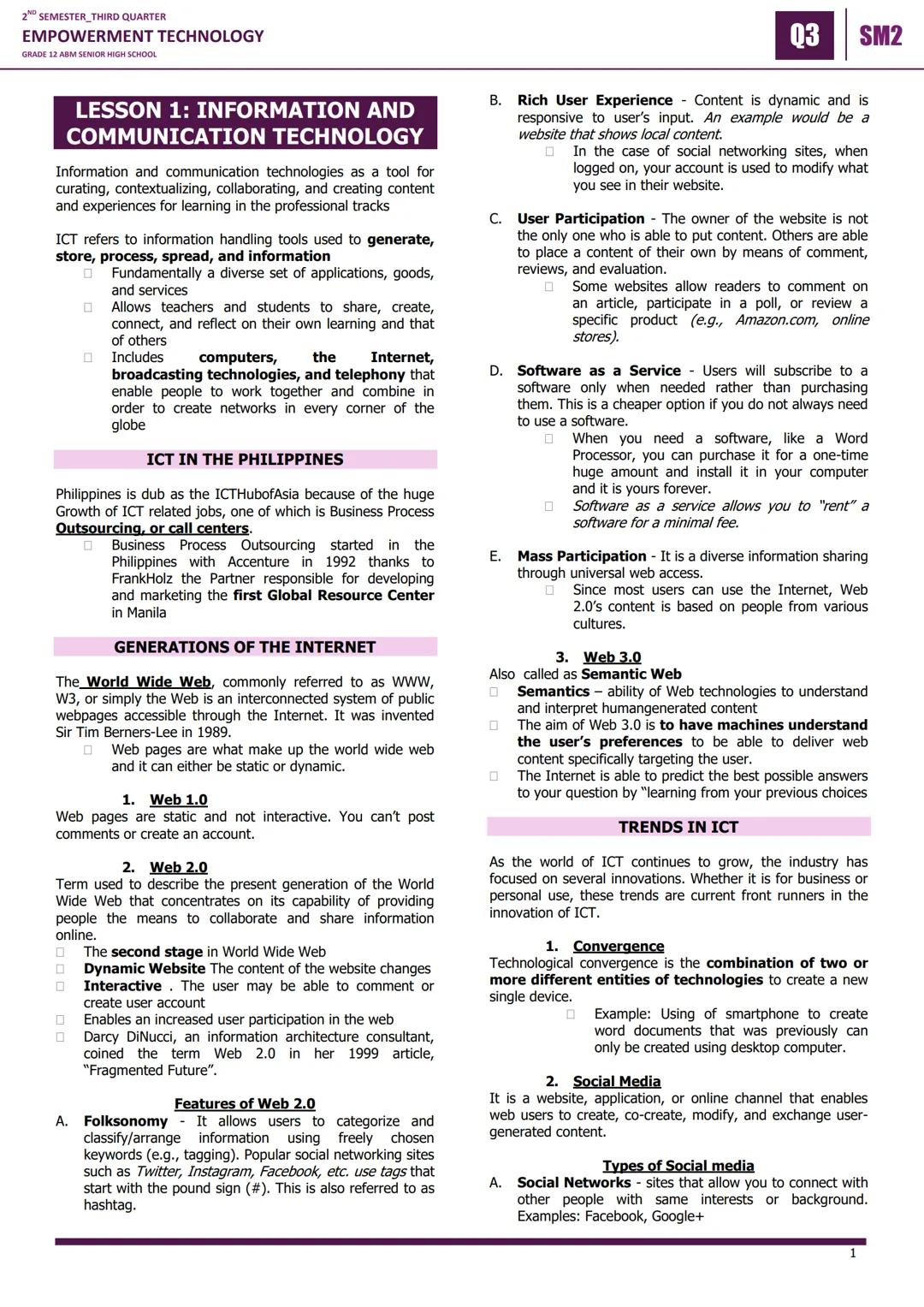
Think about how you use technology every day - that's Information and Communication Technology (ICT) in action! ICT includes all the tools we use to create, store, and share information, from smartphones to the internet.

The Philippines has become the ICT Hub of Asia, especially with our booming call center industry that started with Accenture in 1992. This growth means tons of job opportunities for your generation.

The internet has evolved through three major phases. Web 1.0 was like reading a digital newspaper - you could only view static pages. Web 2.0 (our current web) is interactive, letting you comment, share, and create content on platforms like Facebook and Instagram. Web 3.0 is the future "smart web" that learns your preferences to give you personalized content.

Quick Tip: Understanding these web generations helps you see how technology jobs and opportunities have expanded over time.

Key Web 2.0 features include folksonomy (tagging with hashtags), rich user experiences, user participation, and Software as a Service (SaaS) where you rent software instead of buying it outright.

2ND SEMESTER_THIRD QUARTER
EMPOWERMENT TECHNOLOGY
GRADE 12 ABM SENIOR HIGH SCHOOL
03 SM2
LESSON 1: INFORMATION AND
COMMUNICATION TECHNOLOGY

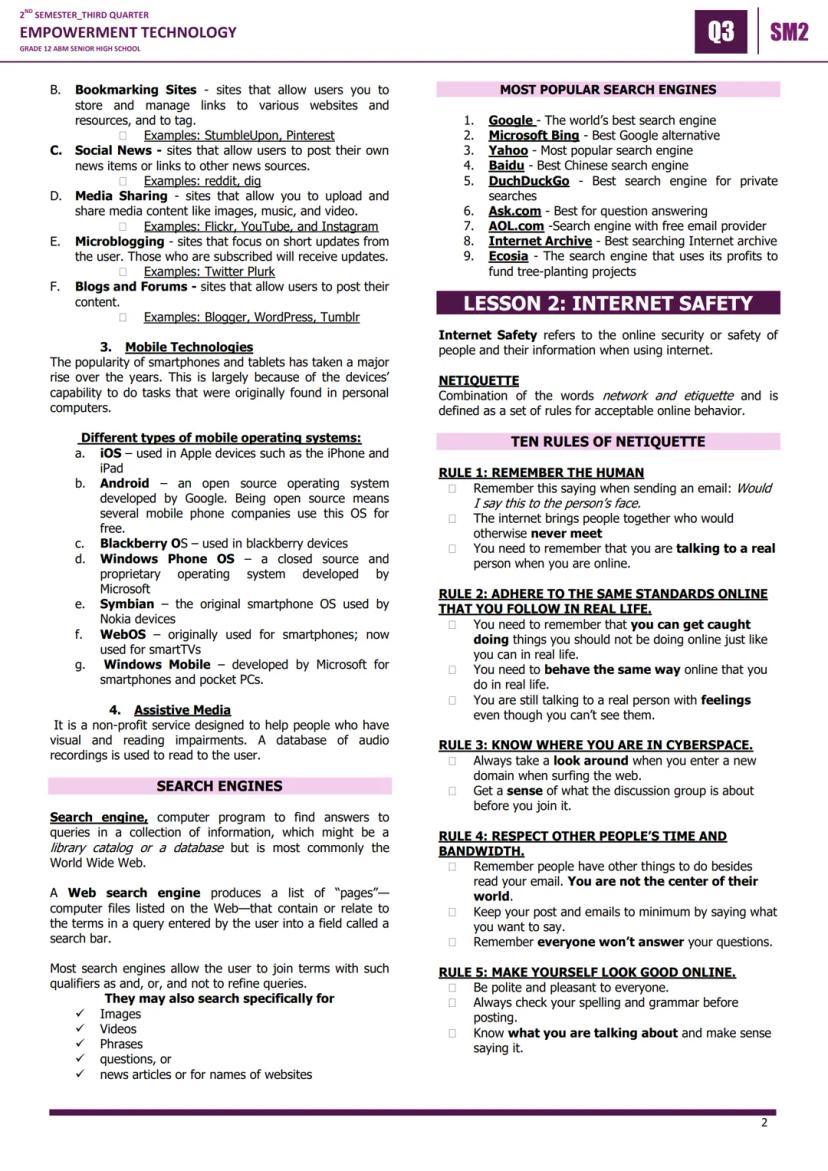
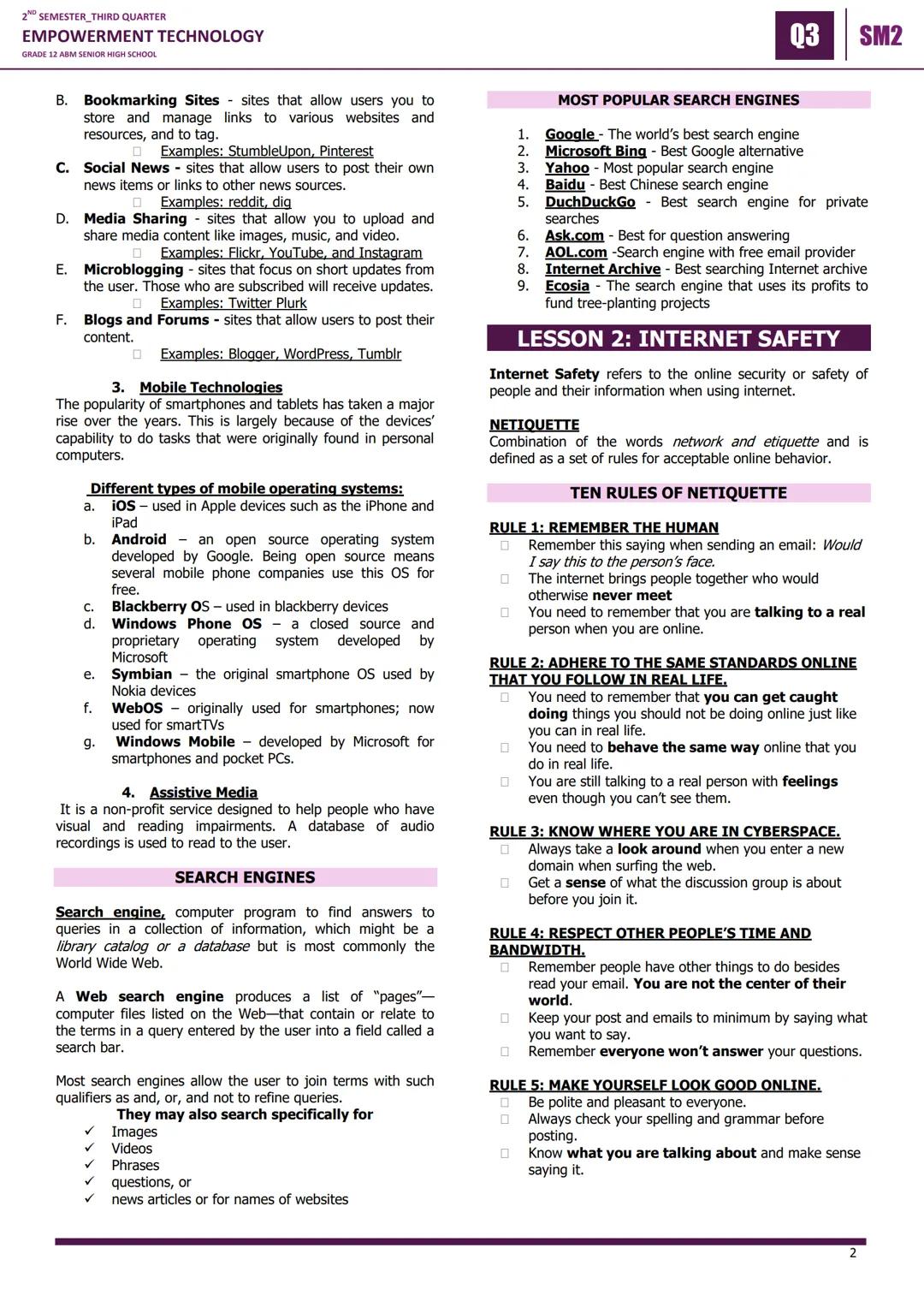
Social Media Types and Mobile Technologies

Social media isn't just entertainment - it's a powerful tool for networking and career building! There are six main types you should know: Social Networks Facebook,Google+Facebook, Google+, Bookmarking Sites (Pinterest), Social News (Reddit), Media Sharing (YouTube, Instagram), Microblogging (Twitter), and Blogs and Forums (WordPress).

Mobile technologies have revolutionized how we work and learn. The major operating systems are iOS (Apple), Android GooglesopensourcesystemGoogle's open-source system, BlackBerry OS, Windows Phone OS, Symbian (old Nokia phones), WebOS (smart TVs), and Windows Mobile.

Assistive media technologies help people with visual and reading impairments access digital content through audio recordings and other tools.

Did You Know: Android being "open source" means it's free for phone manufacturers to use, which is why so many different brands run Android!

Understanding these platforms helps you choose the right tools for school projects, personal branding, and future career networking.

2ND SEMESTER_THIRD QUARTER
EMPOWERMENT TECHNOLOGY
GRADE 12 ABM SENIOR HIGH SCHOOL
03 SM2
LESSON 1: INFORMATION AND
COMMUNICATION TECHNOLOGY

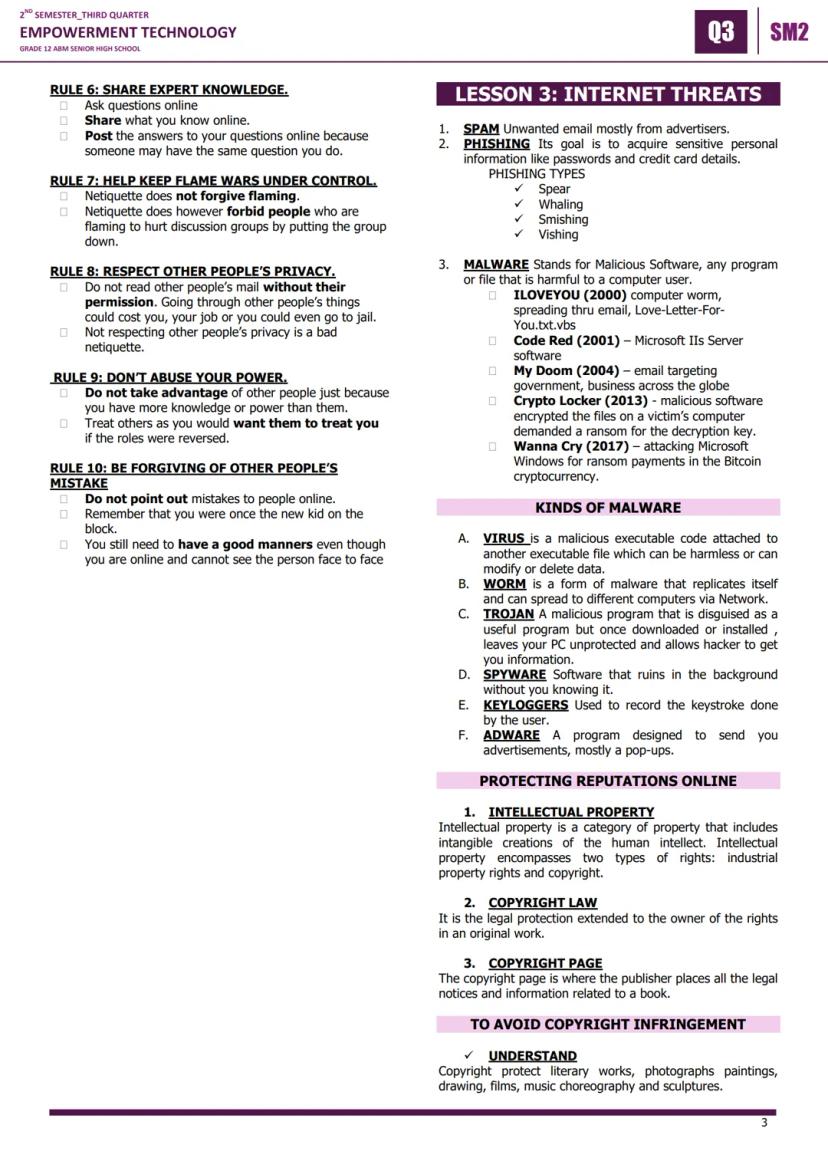
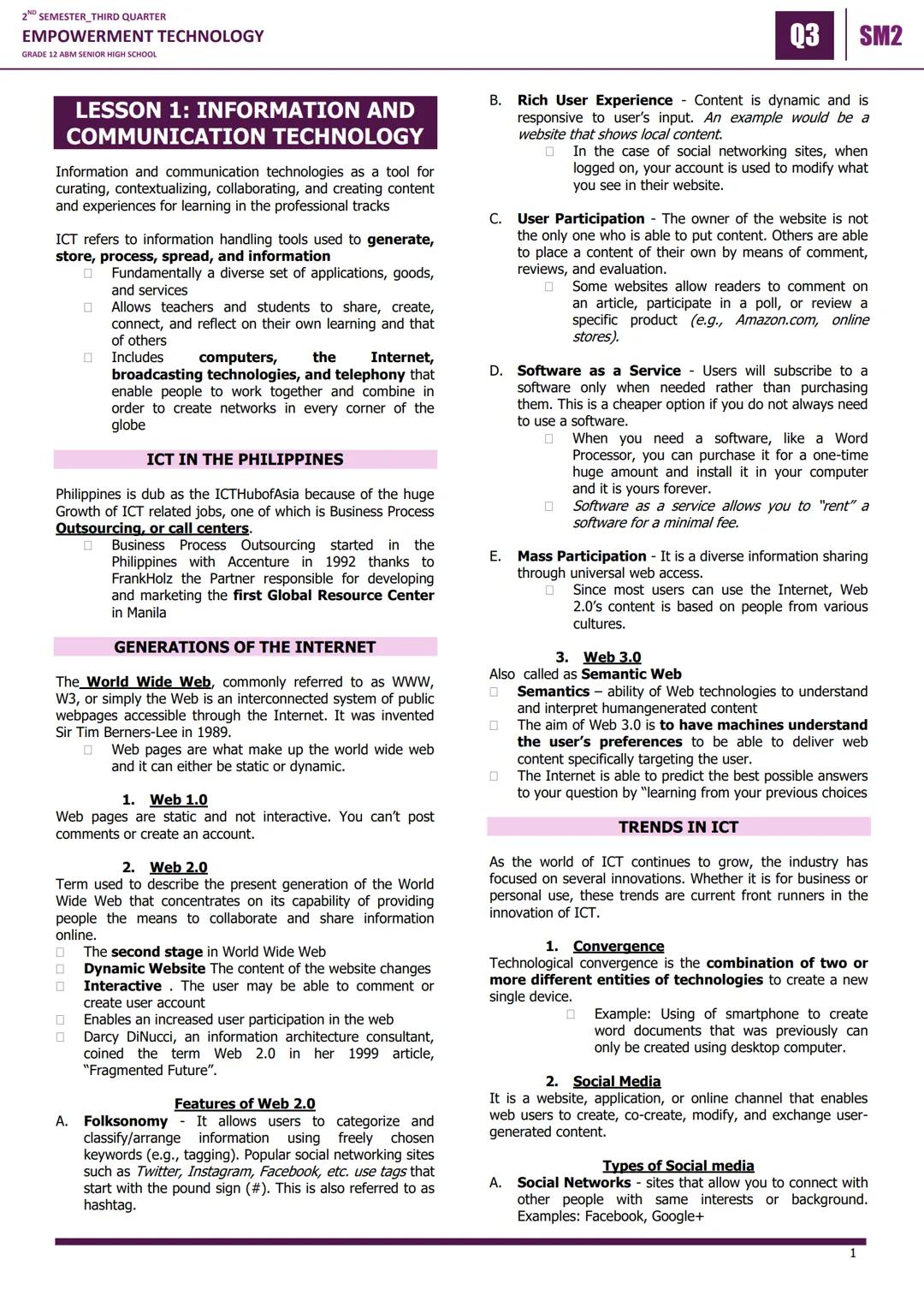
Internet Safety and Netiquette

Internet safety and netiquette network+etiquettenetwork + etiquette are crucial skills for your digital life. The golden rule? Always remember you're talking to real humans online, so treat them with the same respect you'd show face-to-face.

The Ten Rules of Netiquette include: remember the human, maintain real-life standards online, know where you are in cyberspace, respect others' time, make yourself look good online, share expert knowledge, control flame wars, respect privacy, don't abuse power, and forgive mistakes.

Major internet threats include spam (unwanted emails), phishing (stealing personal info), and malware (malicious software). Famous malware attacks include ILOVEYOU (2000), Code Red (2001), MyDoom (2004), CryptoLocker (2013), and WannaCry (2017).

Stay Safe: Never give personal information like passwords or credit card details through email or suspicious websites.

Malware types include viruses (attached to other files), worms selfreplicatingself-replicating, trojans (disguised harmful programs), spyware (hidden monitoring), keyloggers (keystroke recording), and adware (unwanted advertisements).

2ND SEMESTER_THIRD QUARTER
EMPOWERMENT TECHNOLOGY
GRADE 12 ABM SENIOR HIGH SCHOOL
03 SM2
LESSON 1: INFORMATION AND
COMMUNICATION TECHNOLOGY

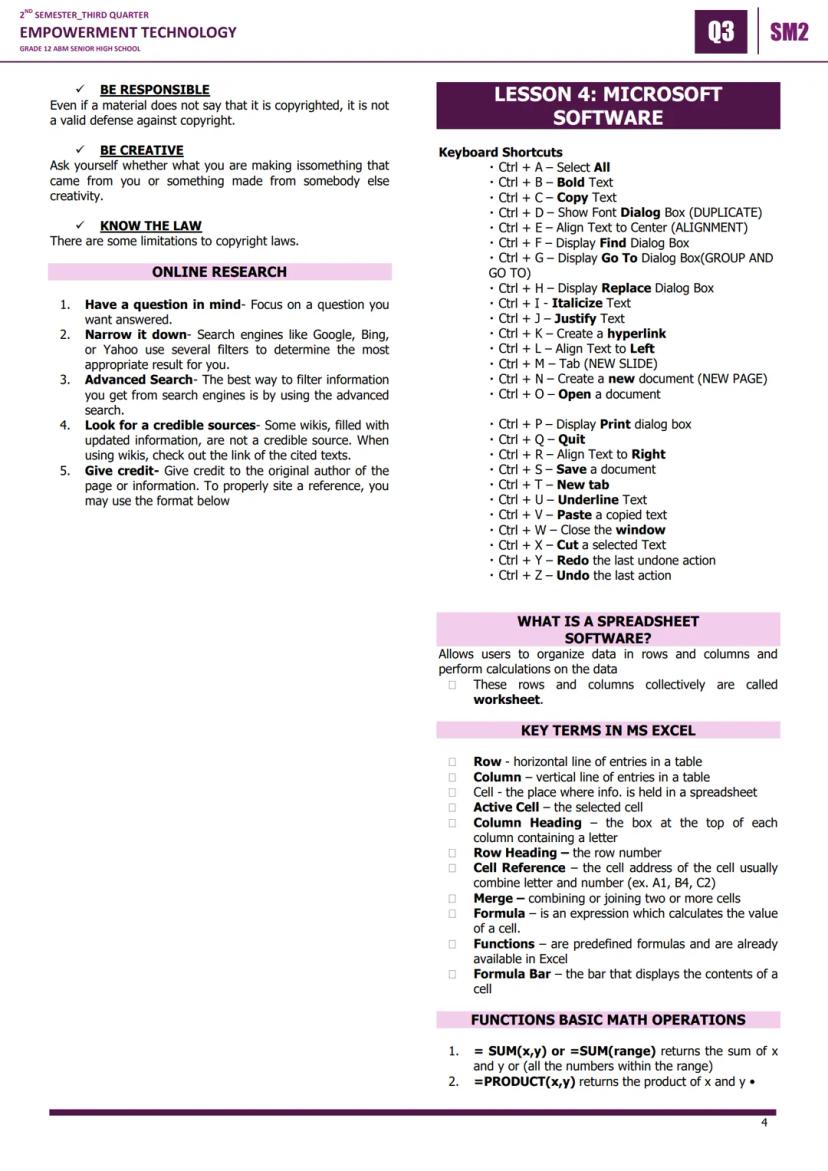
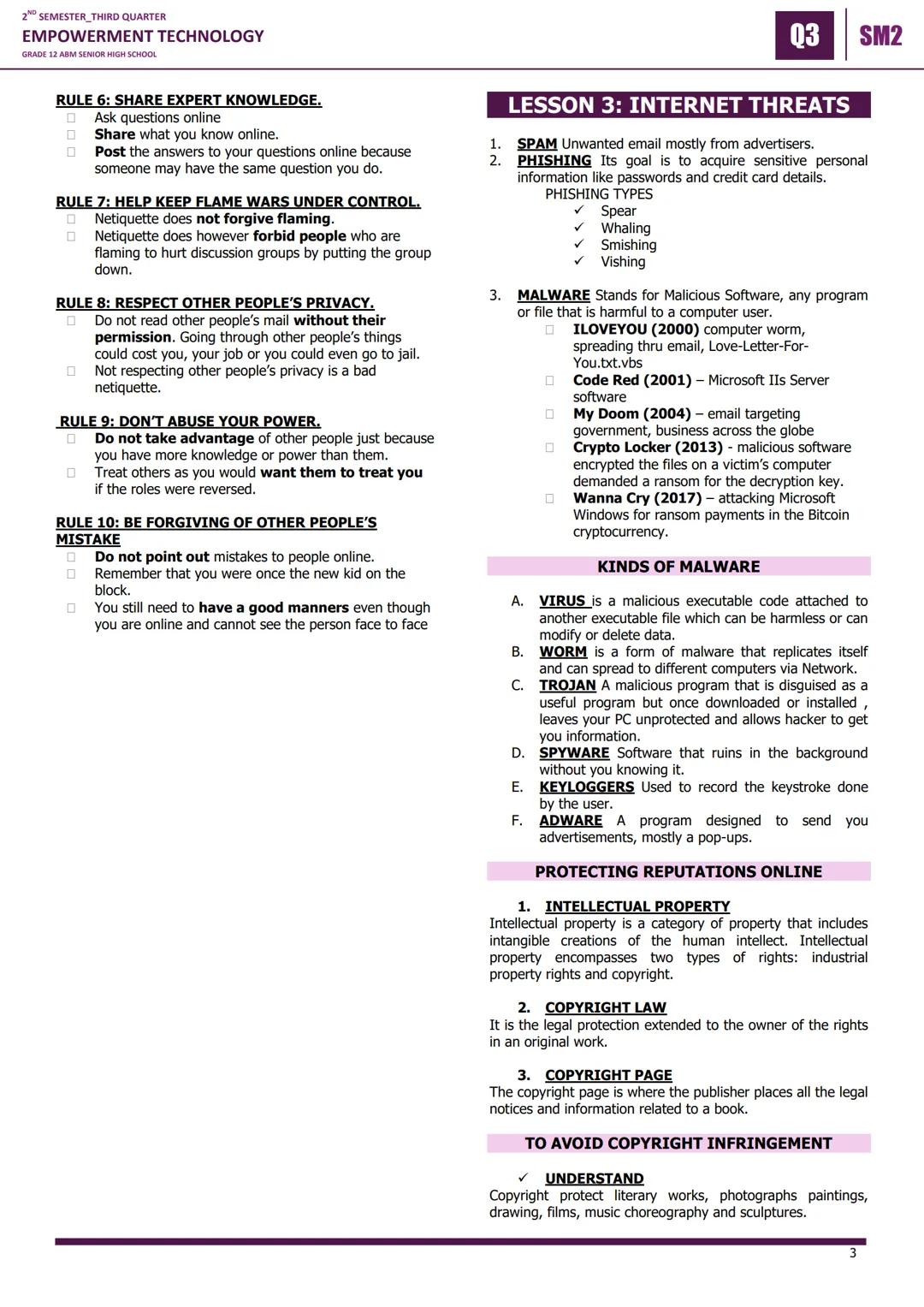
Copyright, Research, and Excel Basics

Intellectual property and copyright laws protect creators' original works. Even if something doesn't say "copyrighted," it's still protected! Always give credit to original authors and be creative rather than copying others' work.

For online research, start with a focused question, narrow your search terms, use advanced search filters, look for credible sources (be careful with wikis), and always give proper credit to your sources.

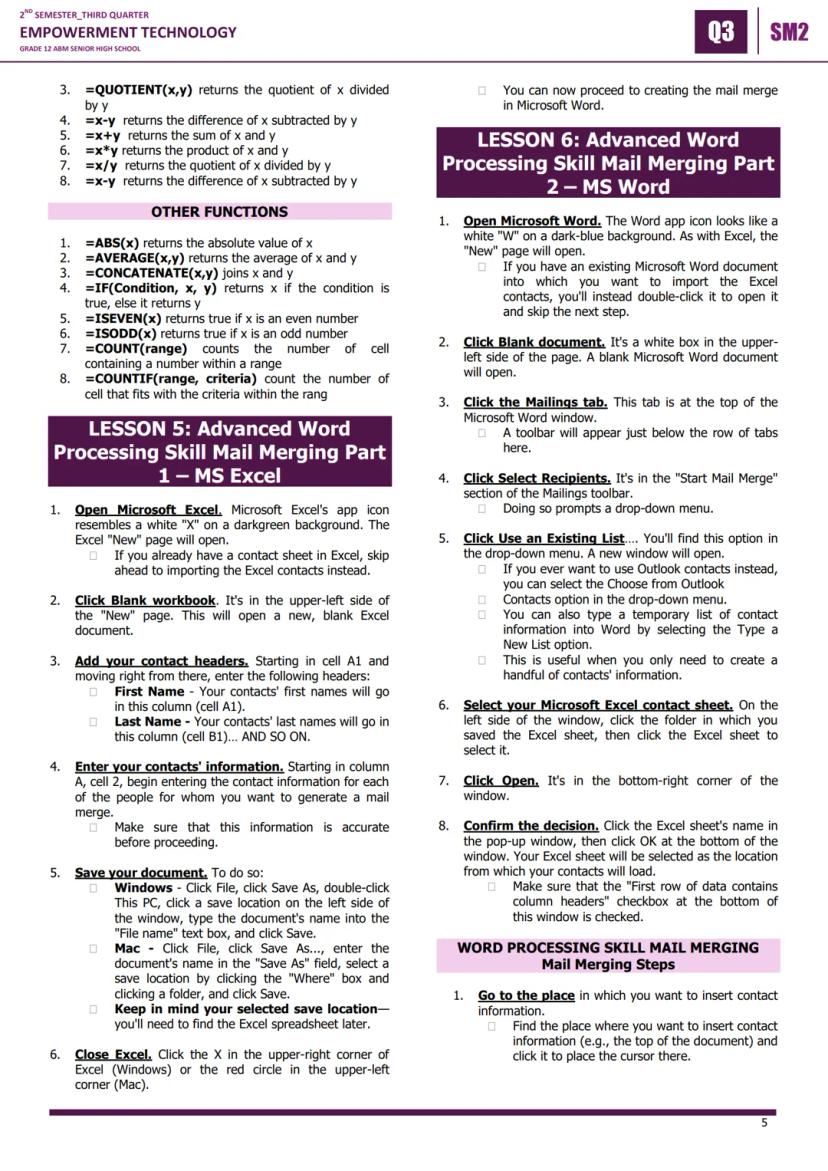
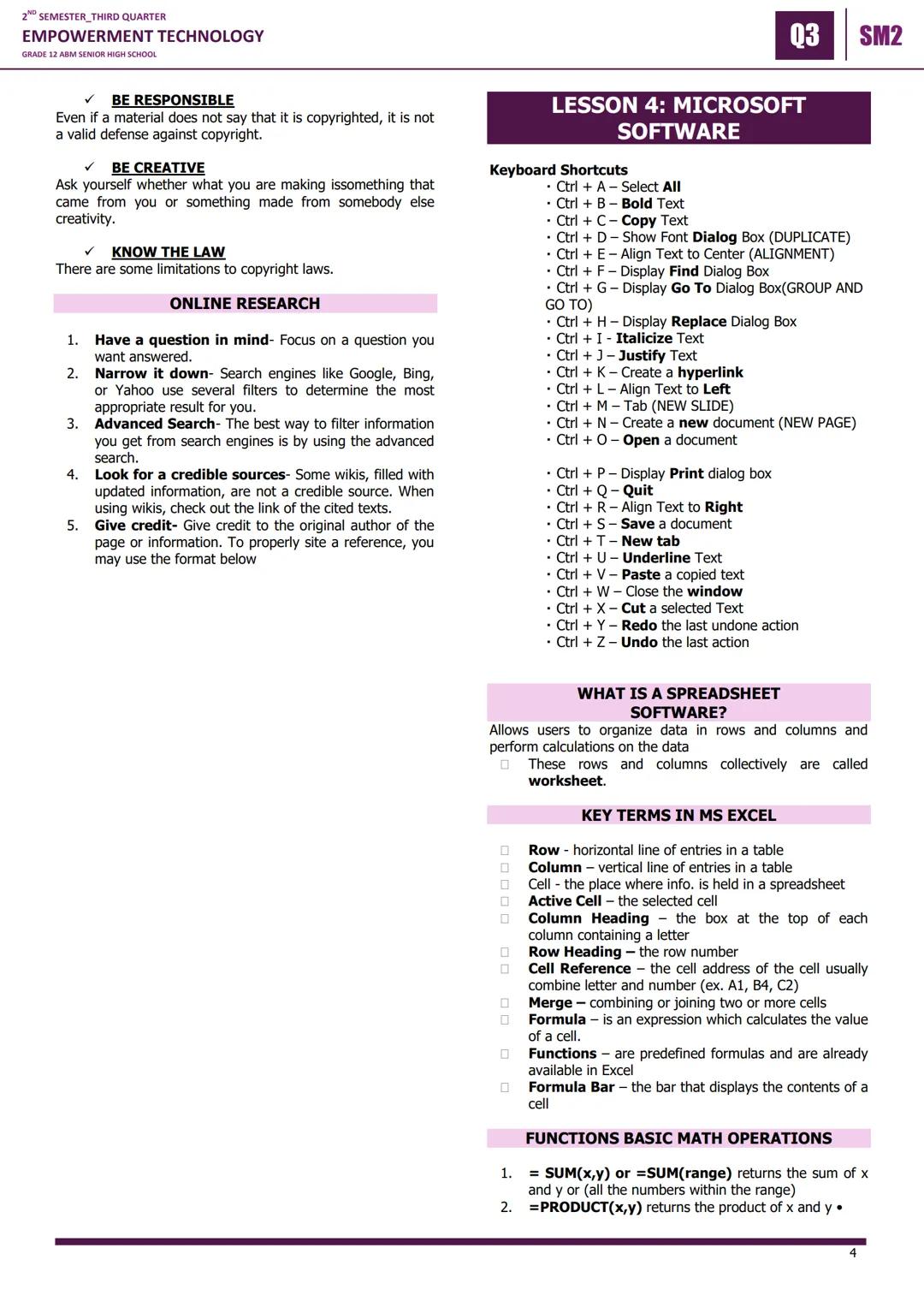
Microsoft Excel is a powerful spreadsheet software that organizes data in rows and columns. Key terms include cells (individual data boxes), active cells (currently selected), cell references (like A1, B2), formulas (calculations), and functions prebuiltformulaspre-built formulas.

Pro Tip: Learning Excel keyboard shortcuts like Ctrl+C (copy), Ctrl+V (paste), and Ctrl+S (save) will make you much faster and more efficient.

Essential Excel functions include =SUM() for adding numbers, =AVERAGE() for calculating means, =IF() for conditional statements, =COUNT() for counting cells, and basic math operations using +, -, *, and / symbols.

2ND SEMESTER_THIRD QUARTER
EMPOWERMENT TECHNOLOGY
GRADE 12 ABM SENIOR HIGH SCHOOL
03 SM2
LESSON 1: INFORMATION AND
COMMUNICATION TECHNOLOGY

Mail Merge Setup in Excel and Word

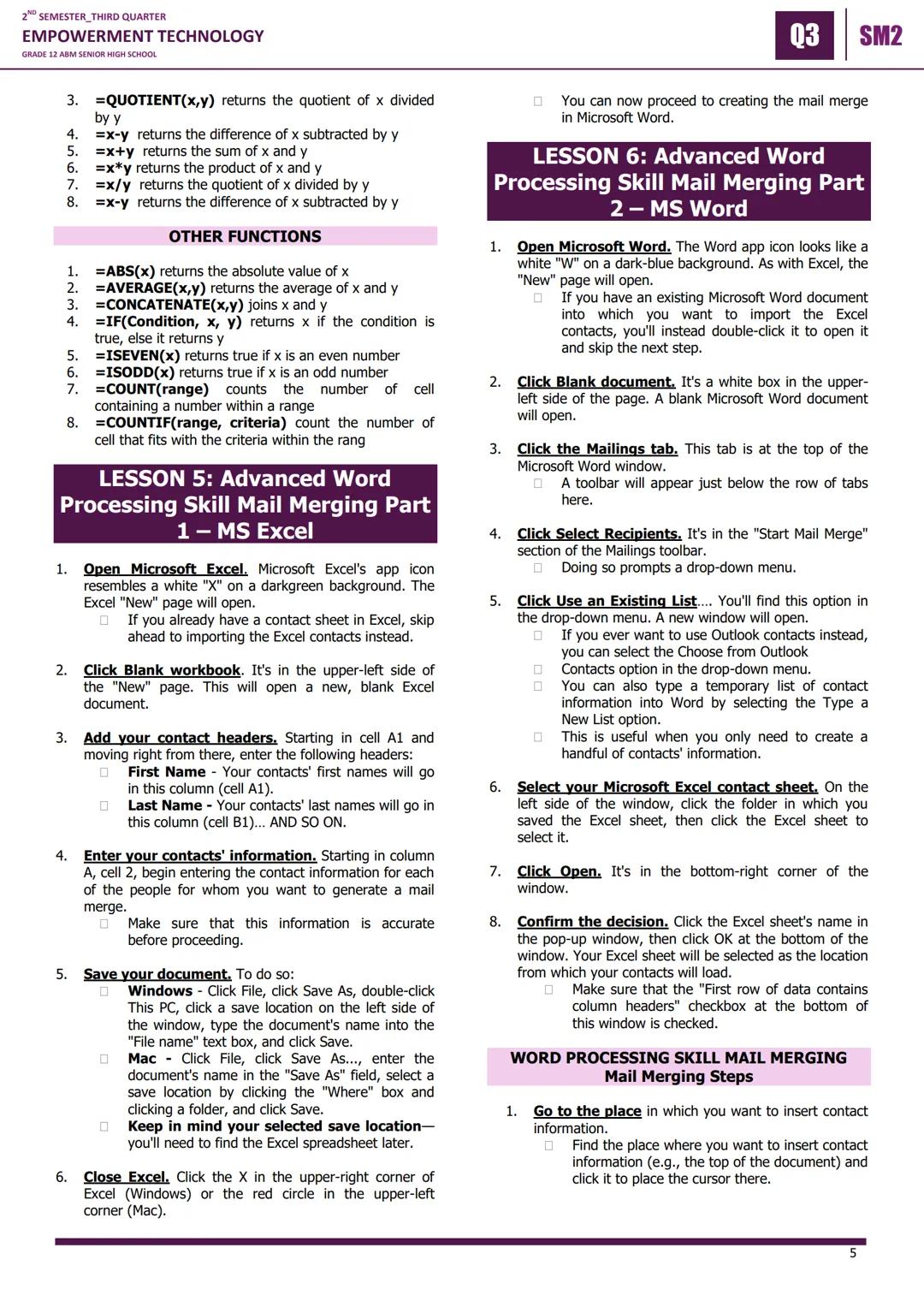
Mail merge is a powerful feature that lets you create personalized documents for multiple recipients - perfect for certificates, invitations, or business letters. You'll start by creating your contact list in Microsoft Excel.

In Excel, set up your contact headers in row 1 (First Name, Last Name, Email, etc.) and enter all your contact information in the rows below. Save this file in a location you'll remember - you'll need to find it later in Word.

Moving to Microsoft Word, go to the Mailings tab and click "Select Recipients," then choose "Use an Existing List" to import your Excel file. Make sure the "First row of data contains column headers" box is checked.

Time Saver: Once you master mail merge, you can create hundreds of personalized documents in minutes instead of hours of manual typing.

To insert contact information, click "Insert Merge Field" and select the fields you want (like First Name or Address). You can add multiple fields and regular text to create professional-looking personalized documents.

2ND SEMESTER_THIRD QUARTER
EMPOWERMENT TECHNOLOGY
GRADE 12 ABM SENIOR HIGH SCHOOL
03 SM2
LESSON 1: INFORMATION AND
COMMUNICATION TECHNOLOGY

Completing Your Mail Merge

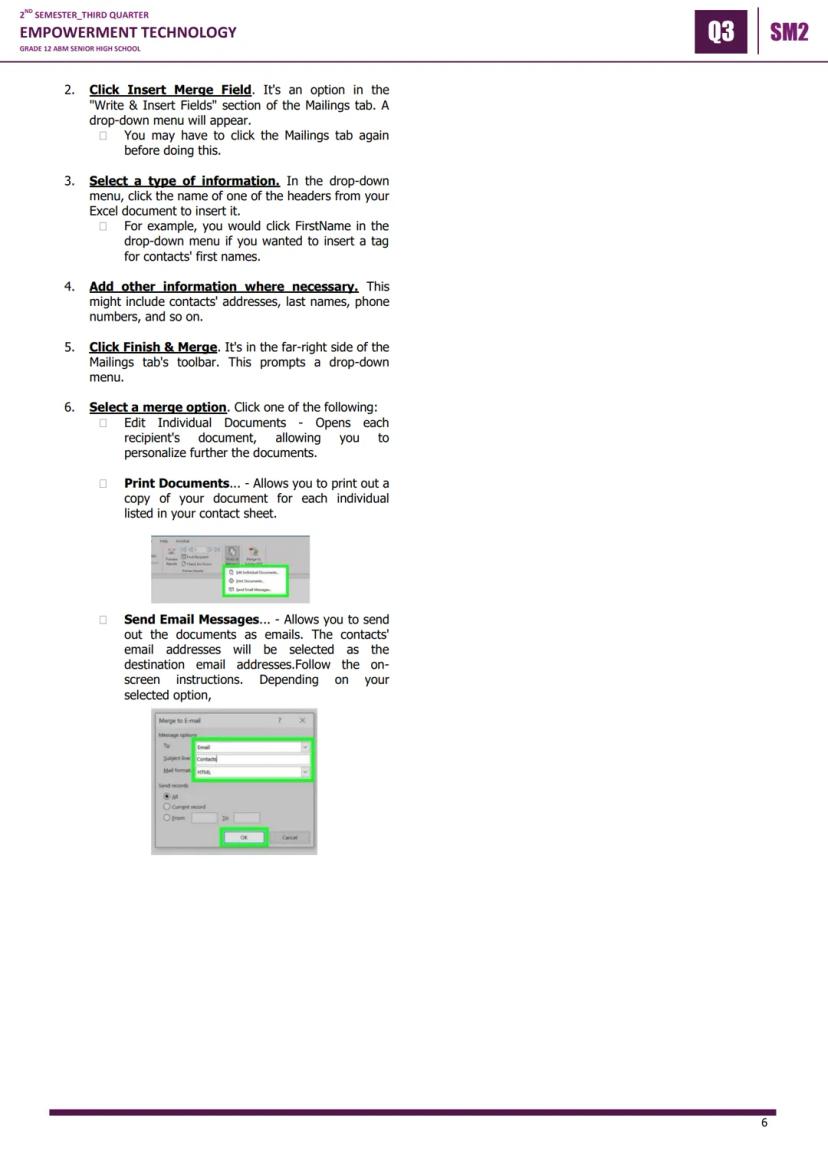
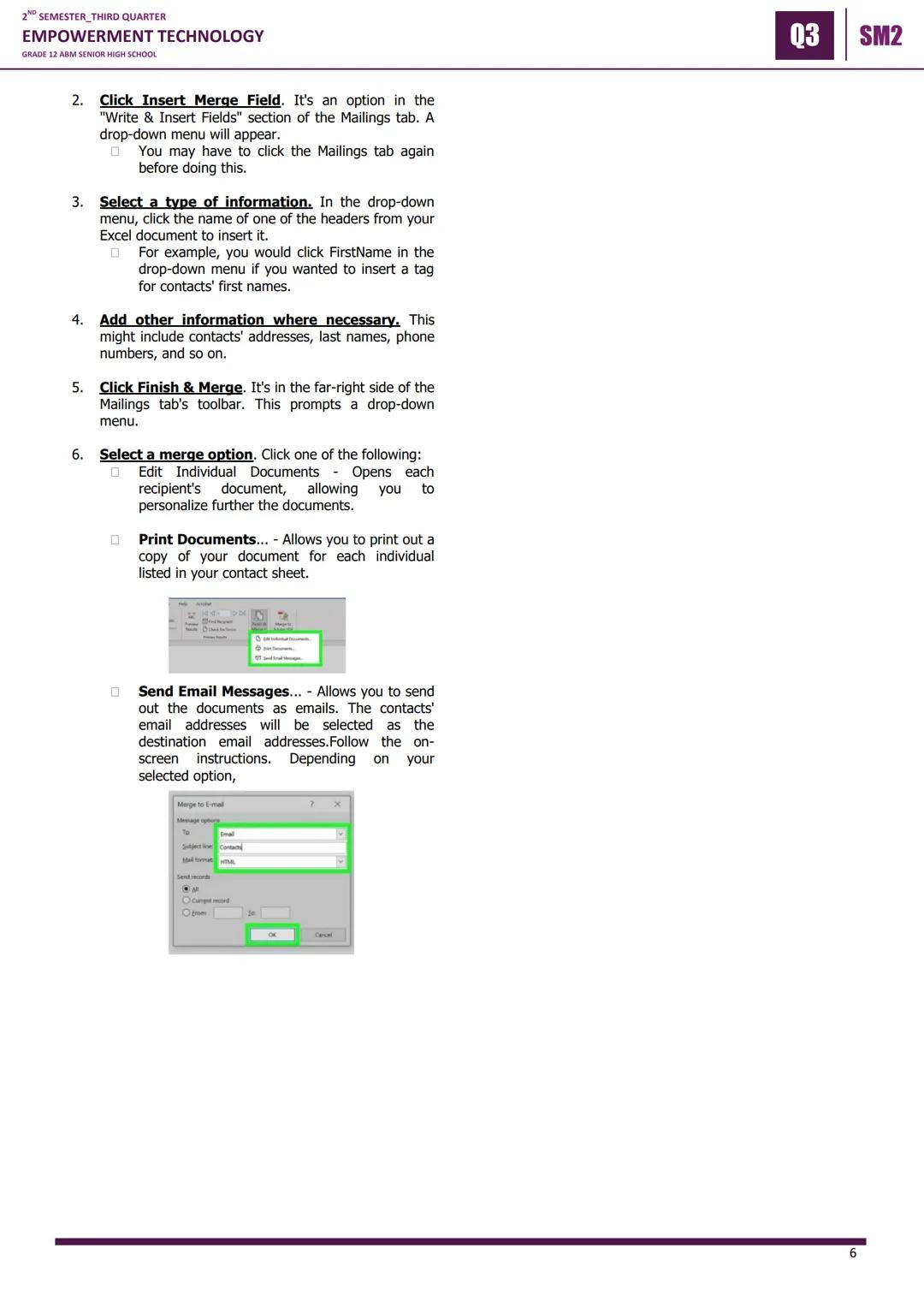
The final step in mail merge is actually generating your personalized documents. Position your cursor where you want contact information to appear, then use "Insert Merge Field" to add specific data like names or addresses.

After setting up all your merge fields, click "Finish & Merge" to see your options. You can "Edit Individual Documents" to customize each one further, "Print Documents" to create physical copies, or "Send Email Messages" to distribute digitally.

The "Edit Individual Documents" option is great when you need to make specific changes to certain recipients' documents. "Print Documents" lets you create hard copies for events or mailing. "Send Email Messages" automatically uses the email addresses from your Excel sheet.

Real-World Application: Mail merge is commonly used in businesses for customer communications, in schools for certificates, and in organizations for event invitations.

Mastering mail merge gives you a valuable skill that employers appreciate, especially in administrative, marketing, and customer service roles where personalized communication is essential.


Akala namin hindi mo na itatanong...

Ano ang Knowunity AI companion?

Ang aming AI Companion ay isang AI tool na nakatuon sa mga estudyante na nag-aalok ng higit pa sa mga sagot lang. Binuo mula sa milyong Knowunity resources, nagbibigay ito ng may-kaugnayang impormasyon, personalized na study plans, quizzes, at content direkta sa chat, na umaangkop sa iyong sariling learning journey.

Saan ko mada-download ang Knowunity app?

Maaari mong i-download ang app mula sa Google Play Store at Apple App Store.

Talaga bang libre ang Knowunity?

Tama 'yan! Mag-enjoy sa libreng access sa mga study content, makipag-connect sa kapwa mga estudyante, at kumuha ng instant na tulong – lahat nasa iyong daliri lang.

Hindi mo mahanap ang hinahanap mo? Tuklasin ang iba pang mga asignatura.

Gustong-gusto kami ng mga estudyante — at magiging ganoon ka rin.

4.9/5

App Store

4.8/5

Google Play

Napakadaling gamitin at maganda ang disenyo ng app. Nahanap ko lahat ng hinahanap ko hanggang ngayon at natuto ako ng marami mula sa mga presentasyon! Tiyak na gagamitin ko ang app para sa isang takdang-aralin sa klase! At siyempre, nakakatulong din ito bilang inspirasyon.

Stefan S

gumagamit ng iOS

Sobrang ganda talaga ng app na ito. Maraming mga study notes at tulong [...]. Ang problemang subject ko ay Pranses, halimbawa, at ang app ay may maraming options para tumulong. Salamat sa app na ito, bumuti ang Pranses ko. Irerekumenda ko ito sa lahat.

Samantha Klich

Android user

Wow, talagang namangha ako. Sinubukan ko lang ang app dahil nakita ko itong ina-advertise nang maraming beses at sobrang nagulat ako. Ang app na ito ang TULONG na gusto mo para sa paaralan at higit sa lahat, nag-aalok ito ng maraming bagay, tulad ng workouts at fact sheets, na SOBRANG nakatulong sa akin.

Anna

iOS user

Pinakamagandang app sa mundo! walang masabi dahil sobrang ganda nito

Thomas R

iOS user

Napakaganda talaga. Nakakapag-review ako ng 10x mas mabuti, itong app ay mabilis na 10/10. Lubos kong inirerekomenda ito sa lahat. Pwede akong manood at maghanap ng notes. Pwede kong i-save ang mga ito sa subject folder. Pwede kong i-review anumang oras kapag bumalik ako. Kung hindi mo pa nasubukan ang app na ito, marami kang nawawala.

Basil

Android user

Ang app na ito ay nagpapalakas ng loob ko sa paghahanda sa exams, hindi lang dahil sa pagpapataas ng aking kumpiyansa sa sarili sa pamamagitan ng mga feature na nagpapahintulot sa iyo na makipag-connect sa iba at mabawasan ang pakiramdam na nag-iisa, kundi pati na rin sa paraan na nakatuon ang app sa pagpapagaan ng iyong pakiramdam. Madali itong i-navigate, masaya gamitin, at nakakatulong sa sinumang nahihirapan sa kahit anong paraan.

David K

iOS user

Sobrang galing ng app! Ilalagay ko lang ang paksa sa search bar at makakakuha na ako ng sagot kaagad. Hindi ko kailangang manood ng 10 YouTube videos para maintindihan ang isang bagay, kaya nakakatipid ako ng oras. Lubos na inirerekomenda!

Sudenaz Ocak

Android user

Sa paaralan, napakahina ko sa math pero salamat sa app, mas mahusay na ako ngayon. Lubos akong nagpapasalamat na ginawa niyo ang app na ito.

Greenlight Bonnie

Android user

napakareliable na app para tumulong at palawakin ang iyong mga ideya sa Math, English at iba pang mga related na paksa sa iyong mga gawain. gamitin mo ang app na ito kung nahihirapan ka sa mga area, susi ito para diyan. sana nag-review na ako dati. at libre rin ito kaya huwag mag-alala tungkol diyan.

Rohan U

Android user

Alam kong maraming apps gumagamit ng fake accounts para mapataas ang kanilang reviews pero ang app na ito ay deserve lahat ng papuri. Dati nakakakuha ako ng 4 sa aking English exams at ngayon nakakuha ako ng grade 7. Hindi ko pa alam ang app na ito tatlong araw bago ang exam at nakatulong ito ng SOBRA. Pakisuyong maniwala sa akin at gamitin ito dahil sigurado akong makikita mo rin ang mga pagbabago.

Xander S

iOS user

SOBRANG KAPAKI-PAKINABANG NG MGA QUIZZES AT FLASHCARDS AT SOBRANG GUSTO KO ANG SCHOOLGPT. PARANG CHATGPT DIN PERO MAS MATALINO!! TINULUNGAN DIN AKO SA AKING MASCARA PROBLEMS!! PATI NA RIN SA AKING TUNAY NA MGA SUBJECTS! DUHHH 😍😁😲🤑💗✨🎀😮

Elisha

iOS user

Grabe talaga ang app na to. Sobrang nakakaboring sakin ang pagreview pero ginagawa ng app na to na sobrang dali mag-organize ng lahat at pwede mong tanungin ang libreng ai para subukin ang sarili mo kaya sobrang buti at madali mong ma-upload ang sarili mong mga bagay. highly recommend bilang isang taong nagte-take ng mocks ngayon

Paul T

iOS user

Napakadaling gamitin at maganda ang disenyo ng app. Nahanap ko lahat ng hinahanap ko hanggang ngayon at natuto ako ng marami mula sa mga presentasyon! Tiyak na gagamitin ko ang app para sa isang takdang-aralin sa klase! At siyempre, nakakatulong din ito bilang inspirasyon.

Stefan S

gumagamit ng iOS

Sobrang ganda talaga ng app na ito. Maraming mga study notes at tulong [...]. Ang problemang subject ko ay Pranses, halimbawa, at ang app ay may maraming options para tumulong. Salamat sa app na ito, bumuti ang Pranses ko. Irerekumenda ko ito sa lahat.

Samantha Klich

Android user

Wow, talagang namangha ako. Sinubukan ko lang ang app dahil nakita ko itong ina-advertise nang maraming beses at sobrang nagulat ako. Ang app na ito ang TULONG na gusto mo para sa paaralan at higit sa lahat, nag-aalok ito ng maraming bagay, tulad ng workouts at fact sheets, na SOBRANG nakatulong sa akin.

Anna

iOS user

Pinakamagandang app sa mundo! walang masabi dahil sobrang ganda nito

Thomas R

iOS user

Napakaganda talaga. Nakakapag-review ako ng 10x mas mabuti, itong app ay mabilis na 10/10. Lubos kong inirerekomenda ito sa lahat. Pwede akong manood at maghanap ng notes. Pwede kong i-save ang mga ito sa subject folder. Pwede kong i-review anumang oras kapag bumalik ako. Kung hindi mo pa nasubukan ang app na ito, marami kang nawawala.

Basil

Android user

Ang app na ito ay nagpapalakas ng loob ko sa paghahanda sa exams, hindi lang dahil sa pagpapataas ng aking kumpiyansa sa sarili sa pamamagitan ng mga feature na nagpapahintulot sa iyo na makipag-connect sa iba at mabawasan ang pakiramdam na nag-iisa, kundi pati na rin sa paraan na nakatuon ang app sa pagpapagaan ng iyong pakiramdam. Madali itong i-navigate, masaya gamitin, at nakakatulong sa sinumang nahihirapan sa kahit anong paraan.

David K

iOS user

Sobrang galing ng app! Ilalagay ko lang ang paksa sa search bar at makakakuha na ako ng sagot kaagad. Hindi ko kailangang manood ng 10 YouTube videos para maintindihan ang isang bagay, kaya nakakatipid ako ng oras. Lubos na inirerekomenda!

Sudenaz Ocak

Android user

Sa paaralan, napakahina ko sa math pero salamat sa app, mas mahusay na ako ngayon. Lubos akong nagpapasalamat na ginawa niyo ang app na ito.

Greenlight Bonnie

Android user

napakareliable na app para tumulong at palawakin ang iyong mga ideya sa Math, English at iba pang mga related na paksa sa iyong mga gawain. gamitin mo ang app na ito kung nahihirapan ka sa mga area, susi ito para diyan. sana nag-review na ako dati. at libre rin ito kaya huwag mag-alala tungkol diyan.

Rohan U

Android user

Alam kong maraming apps gumagamit ng fake accounts para mapataas ang kanilang reviews pero ang app na ito ay deserve lahat ng papuri. Dati nakakakuha ako ng 4 sa aking English exams at ngayon nakakuha ako ng grade 7. Hindi ko pa alam ang app na ito tatlong araw bago ang exam at nakatulong ito ng SOBRA. Pakisuyong maniwala sa akin at gamitin ito dahil sigurado akong makikita mo rin ang mga pagbabago.

Xander S

iOS user

SOBRANG KAPAKI-PAKINABANG NG MGA QUIZZES AT FLASHCARDS AT SOBRANG GUSTO KO ANG SCHOOLGPT. PARANG CHATGPT DIN PERO MAS MATALINO!! TINULUNGAN DIN AKO SA AKING MASCARA PROBLEMS!! PATI NA RIN SA AKING TUNAY NA MGA SUBJECTS! DUHHH 😍😁😲🤑💗✨🎀😮

Elisha

iOS user

Grabe talaga ang app na to. Sobrang nakakaboring sakin ang pagreview pero ginagawa ng app na to na sobrang dali mag-organize ng lahat at pwede mong tanungin ang libreng ai para subukin ang sarili mo kaya sobrang buti at madali mong ma-upload ang sarili mong mga bagay. highly recommend bilang isang taong nagte-take ng mocks ngayon

Paul T

iOS user


EmTech

2,627

Dis 6, 2025

6 mga pahina

Empowerment Technology: Exploring ICT

P

Paul Daniel Eduarte

@pauldanieleduar

Ever wondered how ICT shapes our daily lives and future careers? This comprehensive guide covers everything from the evolution of the internet to advanced Microsoft Office skills that you'll actually use in college and work.

2ND SEMESTER_THIRD QUARTER
EMPOWERMENT TECHNOLOGY
GRADE 12 ABM SENIOR HIGH SCHOOL
03 SM2
LESSON 1: INFORMATION AND
COMMUNICATION TECHNOLOGY

Mag-sign up para makita ang contentLibre ito!

Access sa lahat ng dokumento

Pagbutihin ang iyong mga grado

Sumali sa milyong mga estudyante

Sa pag-sign up, tinatanggap mo ang Terms of Service at Privacy Policy

ICT Fundamentals and Web Evolution

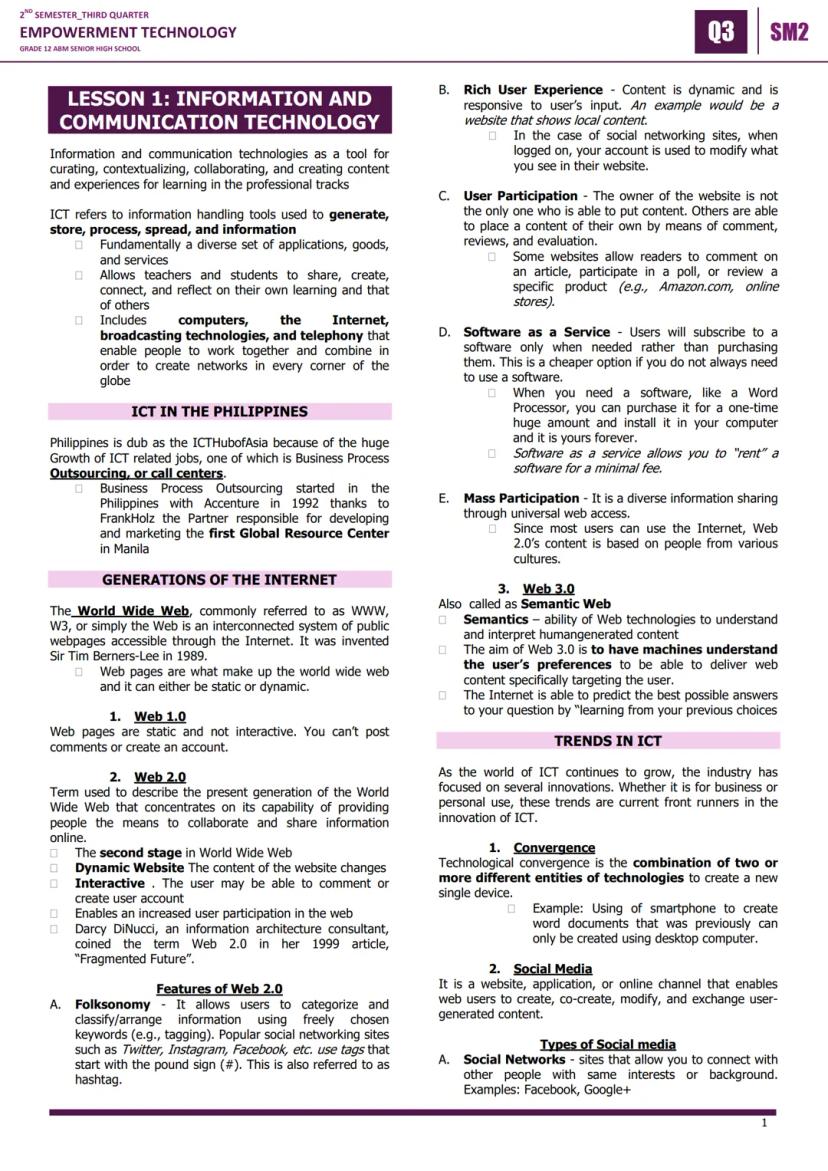
Think about how you use technology every day - that's Information and Communication Technology (ICT) in action! ICT includes all the tools we use to create, store, and share information, from smartphones to the internet.

The Philippines has become the ICT Hub of Asia, especially with our booming call center industry that started with Accenture in 1992. This growth means tons of job opportunities for your generation.

The internet has evolved through three major phases. Web 1.0 was like reading a digital newspaper - you could only view static pages. Web 2.0 (our current web) is interactive, letting you comment, share, and create content on platforms like Facebook and Instagram. Web 3.0 is the future "smart web" that learns your preferences to give you personalized content.

Quick Tip: Understanding these web generations helps you see how technology jobs and opportunities have expanded over time.

Key Web 2.0 features include folksonomy (tagging with hashtags), rich user experiences, user participation, and Software as a Service (SaaS) where you rent software instead of buying it outright.

2ND SEMESTER_THIRD QUARTER
EMPOWERMENT TECHNOLOGY
GRADE 12 ABM SENIOR HIGH SCHOOL
03 SM2
LESSON 1: INFORMATION AND
COMMUNICATION TECHNOLOGY

Mag-sign up para makita ang contentLibre ito!

Access sa lahat ng dokumento

Pagbutihin ang iyong mga grado

Sumali sa milyong mga estudyante

Sa pag-sign up, tinatanggap mo ang Terms of Service at Privacy Policy

Social Media Types and Mobile Technologies

Social media isn't just entertainment - it's a powerful tool for networking and career building! There are six main types you should know: Social Networks Facebook,Google+Facebook, Google+, Bookmarking Sites (Pinterest), Social News (Reddit), Media Sharing (YouTube, Instagram), Microblogging (Twitter), and Blogs and Forums (WordPress).

Mobile technologies have revolutionized how we work and learn. The major operating systems are iOS (Apple), Android GooglesopensourcesystemGoogle's open-source system, BlackBerry OS, Windows Phone OS, Symbian (old Nokia phones), WebOS (smart TVs), and Windows Mobile.

Assistive media technologies help people with visual and reading impairments access digital content through audio recordings and other tools.

Did You Know: Android being "open source" means it's free for phone manufacturers to use, which is why so many different brands run Android!

Understanding these platforms helps you choose the right tools for school projects, personal branding, and future career networking.

2ND SEMESTER_THIRD QUARTER
EMPOWERMENT TECHNOLOGY
GRADE 12 ABM SENIOR HIGH SCHOOL
03 SM2
LESSON 1: INFORMATION AND
COMMUNICATION TECHNOLOGY

Mag-sign up para makita ang contentLibre ito!

Access sa lahat ng dokumento

Pagbutihin ang iyong mga grado

Sumali sa milyong mga estudyante

Sa pag-sign up, tinatanggap mo ang Terms of Service at Privacy Policy

Internet Safety and Netiquette

Internet safety and netiquette network+etiquettenetwork + etiquette are crucial skills for your digital life. The golden rule? Always remember you're talking to real humans online, so treat them with the same respect you'd show face-to-face.

The Ten Rules of Netiquette include: remember the human, maintain real-life standards online, know where you are in cyberspace, respect others' time, make yourself look good online, share expert knowledge, control flame wars, respect privacy, don't abuse power, and forgive mistakes.

Major internet threats include spam (unwanted emails), phishing (stealing personal info), and malware (malicious software). Famous malware attacks include ILOVEYOU (2000), Code Red (2001), MyDoom (2004), CryptoLocker (2013), and WannaCry (2017).

Stay Safe: Never give personal information like passwords or credit card details through email or suspicious websites.

Malware types include viruses (attached to other files), worms selfreplicatingself-replicating, trojans (disguised harmful programs), spyware (hidden monitoring), keyloggers (keystroke recording), and adware (unwanted advertisements).
2ND SEMESTER_THIRD QUARTER
EMPOWERMENT TECHNOLOGY
GRADE 12 ABM SENIOR HIGH SCHOOL
03 SM2
LESSON 1: INFORMATION AND
COMMUNICATION TECHNOLOGY

Mag-sign up para makita ang contentLibre ito!

Access sa lahat ng dokumento

Pagbutihin ang iyong mga grado

Sumali sa milyong mga estudyante

Sa pag-sign up, tinatanggap mo ang Terms of Service at Privacy Policy

Copyright, Research, and Excel Basics

Intellectual property and copyright laws protect creators' original works. Even if something doesn't say "copyrighted," it's still protected! Always give credit to original authors and be creative rather than copying others' work.

For online research, start with a focused question, narrow your search terms, use advanced search filters, look for credible sources (be careful with wikis), and always give proper credit to your sources.

Microsoft Excel is a powerful spreadsheet software that organizes data in rows and columns. Key terms include cells (individual data boxes), active cells (currently selected), cell references (like A1, B2), formulas (calculations), and functions prebuiltformulaspre-built formulas.

Pro Tip: Learning Excel keyboard shortcuts like Ctrl+C (copy), Ctrl+V (paste), and Ctrl+S (save) will make you much faster and more efficient.

Essential Excel functions include =SUM() for adding numbers, =AVERAGE() for calculating means, =IF() for conditional statements, =COUNT() for counting cells, and basic math operations using +, -, *, and / symbols.

2ND SEMESTER_THIRD QUARTER
EMPOWERMENT TECHNOLOGY
GRADE 12 ABM SENIOR HIGH SCHOOL
03 SM2
LESSON 1: INFORMATION AND
COMMUNICATION TECHNOLOGY

Mag-sign up para makita ang contentLibre ito!

Access sa lahat ng dokumento

Pagbutihin ang iyong mga grado

Sumali sa milyong mga estudyante

Sa pag-sign up, tinatanggap mo ang Terms of Service at Privacy Policy

Mail Merge Setup in Excel and Word

Mail merge is a powerful feature that lets you create personalized documents for multiple recipients - perfect for certificates, invitations, or business letters. You'll start by creating your contact list in Microsoft Excel.

In Excel, set up your contact headers in row 1 (First Name, Last Name, Email, etc.) and enter all your contact information in the rows below. Save this file in a location you'll remember - you'll need to find it later in Word.

Moving to Microsoft Word, go to the Mailings tab and click "Select Recipients," then choose "Use an Existing List" to import your Excel file. Make sure the "First row of data contains column headers" box is checked.

Time Saver: Once you master mail merge, you can create hundreds of personalized documents in minutes instead of hours of manual typing.

To insert contact information, click "Insert Merge Field" and select the fields you want (like First Name or Address). You can add multiple fields and regular text to create professional-looking personalized documents.

2ND SEMESTER_THIRD QUARTER
EMPOWERMENT TECHNOLOGY
GRADE 12 ABM SENIOR HIGH SCHOOL
03 SM2
LESSON 1: INFORMATION AND
COMMUNICATION TECHNOLOGY

Mag-sign up para makita ang contentLibre ito!

Access sa lahat ng dokumento

Pagbutihin ang iyong mga grado

Sumali sa milyong mga estudyante

Sa pag-sign up, tinatanggap mo ang Terms of Service at Privacy Policy

Completing Your Mail Merge

The final step in mail merge is actually generating your personalized documents. Position your cursor where you want contact information to appear, then use "Insert Merge Field" to add specific data like names or addresses.

After setting up all your merge fields, click "Finish & Merge" to see your options. You can "Edit Individual Documents" to customize each one further, "Print Documents" to create physical copies, or "Send Email Messages" to distribute digitally.

The "Edit Individual Documents" option is great when you need to make specific changes to certain recipients' documents. "Print Documents" lets you create hard copies for events or mailing. "Send Email Messages" automatically uses the email addresses from your Excel sheet.

Real-World Application: Mail merge is commonly used in businesses for customer communications, in schools for certificates, and in organizations for event invitations.

Mastering mail merge gives you a valuable skill that employers appreciate, especially in administrative, marketing, and customer service roles where personalized communication is essential.

Akala namin hindi mo na itatanong...

Ano ang Knowunity AI companion?

Ang aming AI Companion ay isang AI tool na nakatuon sa mga estudyante na nag-aalok ng higit pa sa mga sagot lang. Binuo mula sa milyong Knowunity resources, nagbibigay ito ng may-kaugnayang impormasyon, personalized na study plans, quizzes, at content direkta sa chat, na umaangkop sa iyong sariling learning journey.

Saan ko mada-download ang Knowunity app?

Maaari mong i-download ang app mula sa Google Play Store at Apple App Store.

Talaga bang libre ang Knowunity?

Tama 'yan! Mag-enjoy sa libreng access sa mga study content, makipag-connect sa kapwa mga estudyante, at kumuha ng instant na tulong – lahat nasa iyong daliri lang.

68

Smart Tools NEW

I-transform ang note na ito sa: ✓ 50+ Practice Questions ✓ Interactive Flashcards ✓ Full Mock Exam ✓ Essay Outlines

Praktis Exam
Quiz
Flashcards
Essay

Hindi mo mahanap ang hinahanap mo? Tuklasin ang iba pang mga asignatura.

Gustong-gusto kami ng mga estudyante — at magiging ganoon ka rin.

4.9/5

App Store

4.8/5

Google Play

Napakadaling gamitin at maganda ang disenyo ng app. Nahanap ko lahat ng hinahanap ko hanggang ngayon at natuto ako ng marami mula sa mga presentasyon! Tiyak na gagamitin ko ang app para sa isang takdang-aralin sa klase! At siyempre, nakakatulong din ito bilang inspirasyon.

Stefan S

gumagamit ng iOS

Sobrang ganda talaga ng app na ito. Maraming mga study notes at tulong [...]. Ang problemang subject ko ay Pranses, halimbawa, at ang app ay may maraming options para tumulong. Salamat sa app na ito, bumuti ang Pranses ko. Irerekumenda ko ito sa lahat.

Samantha Klich

Android user

Wow, talagang namangha ako. Sinubukan ko lang ang app dahil nakita ko itong ina-advertise nang maraming beses at sobrang nagulat ako. Ang app na ito ang TULONG na gusto mo para sa paaralan at higit sa lahat, nag-aalok ito ng maraming bagay, tulad ng workouts at fact sheets, na SOBRANG nakatulong sa akin.

Anna

iOS user

Pinakamagandang app sa mundo! walang masabi dahil sobrang ganda nito

Thomas R

iOS user

Napakaganda talaga. Nakakapag-review ako ng 10x mas mabuti, itong app ay mabilis na 10/10. Lubos kong inirerekomenda ito sa lahat. Pwede akong manood at maghanap ng notes. Pwede kong i-save ang mga ito sa subject folder. Pwede kong i-review anumang oras kapag bumalik ako. Kung hindi mo pa nasubukan ang app na ito, marami kang nawawala.

Basil

Android user

Ang app na ito ay nagpapalakas ng loob ko sa paghahanda sa exams, hindi lang dahil sa pagpapataas ng aking kumpiyansa sa sarili sa pamamagitan ng mga feature na nagpapahintulot sa iyo na makipag-connect sa iba at mabawasan ang pakiramdam na nag-iisa, kundi pati na rin sa paraan na nakatuon ang app sa pagpapagaan ng iyong pakiramdam. Madali itong i-navigate, masaya gamitin, at nakakatulong sa sinumang nahihirapan sa kahit anong paraan.

David K

iOS user

Sobrang galing ng app! Ilalagay ko lang ang paksa sa search bar at makakakuha na ako ng sagot kaagad. Hindi ko kailangang manood ng 10 YouTube videos para maintindihan ang isang bagay, kaya nakakatipid ako ng oras. Lubos na inirerekomenda!

Sudenaz Ocak

Android user

Sa paaralan, napakahina ko sa math pero salamat sa app, mas mahusay na ako ngayon. Lubos akong nagpapasalamat na ginawa niyo ang app na ito.

Greenlight Bonnie

Android user

napakareliable na app para tumulong at palawakin ang iyong mga ideya sa Math, English at iba pang mga related na paksa sa iyong mga gawain. gamitin mo ang app na ito kung nahihirapan ka sa mga area, susi ito para diyan. sana nag-review na ako dati. at libre rin ito kaya huwag mag-alala tungkol diyan.

Rohan U

Android user

Alam kong maraming apps gumagamit ng fake accounts para mapataas ang kanilang reviews pero ang app na ito ay deserve lahat ng papuri. Dati nakakakuha ako ng 4 sa aking English exams at ngayon nakakuha ako ng grade 7. Hindi ko pa alam ang app na ito tatlong araw bago ang exam at nakatulong ito ng SOBRA. Pakisuyong maniwala sa akin at gamitin ito dahil sigurado akong makikita mo rin ang mga pagbabago.

Xander S

iOS user

SOBRANG KAPAKI-PAKINABANG NG MGA QUIZZES AT FLASHCARDS AT SOBRANG GUSTO KO ANG SCHOOLGPT. PARANG CHATGPT DIN PERO MAS MATALINO!! TINULUNGAN DIN AKO SA AKING MASCARA PROBLEMS!! PATI NA RIN SA AKING TUNAY NA MGA SUBJECTS! DUHHH 😍😁😲🤑💗✨🎀😮

Elisha

iOS user

Grabe talaga ang app na to. Sobrang nakakaboring sakin ang pagreview pero ginagawa ng app na to na sobrang dali mag-organize ng lahat at pwede mong tanungin ang libreng ai para subukin ang sarili mo kaya sobrang buti at madali mong ma-upload ang sarili mong mga bagay. highly recommend bilang isang taong nagte-take ng mocks ngayon

Paul T

iOS user

Napakadaling gamitin at maganda ang disenyo ng app. Nahanap ko lahat ng hinahanap ko hanggang ngayon at natuto ako ng marami mula sa mga presentasyon! Tiyak na gagamitin ko ang app para sa isang takdang-aralin sa klase! At siyempre, nakakatulong din ito bilang inspirasyon.

Stefan S

gumagamit ng iOS

Sobrang ganda talaga ng app na ito. Maraming mga study notes at tulong [...]. Ang problemang subject ko ay Pranses, halimbawa, at ang app ay may maraming options para tumulong. Salamat sa app na ito, bumuti ang Pranses ko. Irerekumenda ko ito sa lahat.

Samantha Klich

Android user

Wow, talagang namangha ako. Sinubukan ko lang ang app dahil nakita ko itong ina-advertise nang maraming beses at sobrang nagulat ako. Ang app na ito ang TULONG na gusto mo para sa paaralan at higit sa lahat, nag-aalok ito ng maraming bagay, tulad ng workouts at fact sheets, na SOBRANG nakatulong sa akin.

Anna

iOS user

Pinakamagandang app sa mundo! walang masabi dahil sobrang ganda nito

Thomas R

iOS user

Napakaganda talaga. Nakakapag-review ako ng 10x mas mabuti, itong app ay mabilis na 10/10. Lubos kong inirerekomenda ito sa lahat. Pwede akong manood at maghanap ng notes. Pwede kong i-save ang mga ito sa subject folder. Pwede kong i-review anumang oras kapag bumalik ako. Kung hindi mo pa nasubukan ang app na ito, marami kang nawawala.

Basil

Android user

Ang app na ito ay nagpapalakas ng loob ko sa paghahanda sa exams, hindi lang dahil sa pagpapataas ng aking kumpiyansa sa sarili sa pamamagitan ng mga feature na nagpapahintulot sa iyo na makipag-connect sa iba at mabawasan ang pakiramdam na nag-iisa, kundi pati na rin sa paraan na nakatuon ang app sa pagpapagaan ng iyong pakiramdam. Madali itong i-navigate, masaya gamitin, at nakakatulong sa sinumang nahihirapan sa kahit anong paraan.

David K

iOS user

Sobrang galing ng app! Ilalagay ko lang ang paksa sa search bar at makakakuha na ako ng sagot kaagad. Hindi ko kailangang manood ng 10 YouTube videos para maintindihan ang isang bagay, kaya nakakatipid ako ng oras. Lubos na inirerekomenda!

Sudenaz Ocak

Android user

Sa paaralan, napakahina ko sa math pero salamat sa app, mas mahusay na ako ngayon. Lubos akong nagpapasalamat na ginawa niyo ang app na ito.

Greenlight Bonnie

Android user

napakareliable na app para tumulong at palawakin ang iyong mga ideya sa Math, English at iba pang mga related na paksa sa iyong mga gawain. gamitin mo ang app na ito kung nahihirapan ka sa mga area, susi ito para diyan. sana nag-review na ako dati. at libre rin ito kaya huwag mag-alala tungkol diyan.

Rohan U

Android user

Alam kong maraming apps gumagamit ng fake accounts para mapataas ang kanilang reviews pero ang app na ito ay deserve lahat ng papuri. Dati nakakakuha ako ng 4 sa aking English exams at ngayon nakakuha ako ng grade 7. Hindi ko pa alam ang app na ito tatlong araw bago ang exam at nakatulong ito ng SOBRA. Pakisuyong maniwala sa akin at gamitin ito dahil sigurado akong makikita mo rin ang mga pagbabago.

Xander S

iOS user

SOBRANG KAPAKI-PAKINABANG NG MGA QUIZZES AT FLASHCARDS AT SOBRANG GUSTO KO ANG SCHOOLGPT. PARANG CHATGPT DIN PERO MAS MATALINO!! TINULUNGAN DIN AKO SA AKING MASCARA PROBLEMS!! PATI NA RIN SA AKING TUNAY NA MGA SUBJECTS! DUHHH 😍😁😲🤑💗✨🎀😮

Elisha

iOS user

Grabe talaga ang app na to. Sobrang nakakaboring sakin ang pagreview pero ginagawa ng app na to na sobrang dali mag-organize ng lahat at pwede mong tanungin ang libreng ai para subukin ang sarili mo kaya sobrang buti at madali mong ma-upload ang sarili mong mga bagay. highly recommend bilang isang taong nagte-take ng mocks ngayon

Paul T

iOS user